GENIAC Kit Parts List and Modern Rebuild Guide
◆ Revised
Introduction
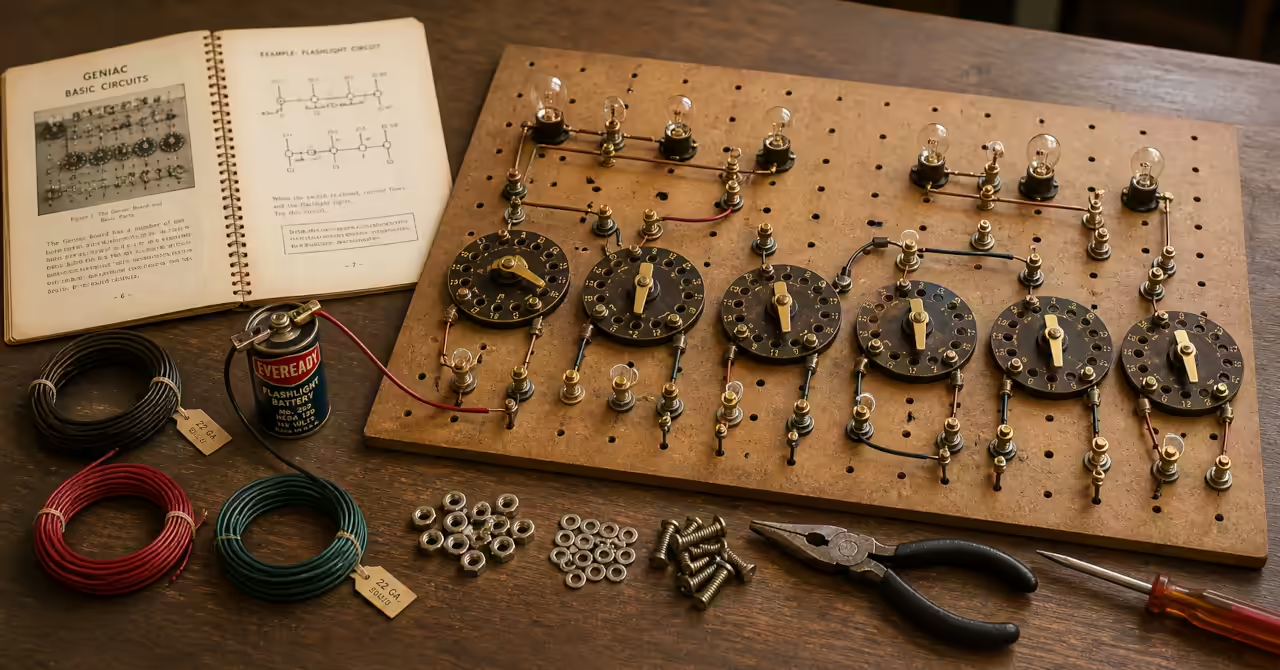
The GENIAC kit is best understood as a small physical grammar for thinking machines. Its parts list looks modest: wire, bulbs, sockets, nuts, bolts, a battery, a panel, and six multiple switches. Yet those parts were enough to build machines that could signal, compare, calculate, translate, and reason. That is the real lesson of the GENIAC manual. The kit was not powerful because it hid complexity. It was powerful because it made complexity visible.
Most readers expect a parts list to be static. The GENIAC kit breaks that expectation. Its components do not describe a machine. They enable many machines, each assembled, tested, and understood through physical interaction.
This matters when reading the wider GENIAC Journal: Hands-On Analogue Computer Kit (1950s). GENIAC was not merely a toy, nor was it a decorative relic of the “electric brain” era. It was a teaching system built from inexpensive, inspectable, reusable parts. The learner did not simply observe computation. The learner assembled it, labelled it, wired it, tested it, corrected it, and learned from the physical behaviour of the circuit.
The parts list also explains how GENIAC could be marketed so effectively to learners. As discussed in How the GENIAC Analogue Computer Kit Was Marketed to Learners, the kit promised entry into computing without requiring a laboratory, an engineering degree, or expensive equipment. Its economy was not a weakness. It was the method. The machine had to be cheap enough to own, simple enough to repair, and flexible enough to rebuild into many different projects.
That flexibility becomes clear when set beside the GENIAC Project List: Building Thinking Machines and Circuits. The same small family of components supports household circuits, burglar alarms, arithmetic machines, game-playing machines, coders, decoders, and logic demonstrations. The system scales not by adding exotic parts, but by recombining simple parts in increasingly disciplined ways.
The GENIAC Kit Parts List
Power and signalling components
- Battery, dry cell, flashlight, 1.5 volts
- The battery supplied the safe, low-voltage power source for the whole kit. Its role was deliberately modest. GENIAC did not require household current, transformers, or specialist power supplies. That made the kit safer, cheaper, and more suitable for hands-on experimentation.
- Modern replacement: A modern 1.5 volt D cell or AA battery holder can be used. The key principle is low-voltage, isolated, battery-powered operation.
- Battery clamp
- The battery clamp held the dry cell in place and provided a practical connection point. A stable power source ensured that the machine behaved predictably during testing and demonstration.
- Modern replacement: A modern battery holder with screw terminals or leads is a simple substitute.
- Flashlight bulbs, 1.5 volts
- The bulbs were the visible outputs of the machine. They showed answers, states, and decisions. GENIAC’s logic is observable, not hidden.
- Modern replacement: Low-voltage bulbs or LEDs with resistors. LEDs improve reliability but change the visual character.
- Sockets for flashlight bulbs
- The sockets made bulbs removable and reusable, turning the panel into an experimental surface rather than a fixed circuit.
- Modern replacement: Panel-mounted lamp holders or LED holders.
Connection and structural system
- Wire, insulated, approximately 50 feet
- The wire carried current between all components. In GENIAC, wiring is programming. Each connection defines behaviour.
- Modern replacement: Standard insulated hookup wire. Solid core wire is easier for structured layouts.
- Bolts, 6/32, half inch
- The bolts acted as both fasteners and electrical terminals. This dual role enabled circuits to be assembled and modified without soldering.
- Modern replacement: Machine screws or terminal posts that allow repeated connections.
- Nuts, 6/32
- The nuts secured connections and ensured electrical contact. They made every connection deliberate and reversible.
- Modern replacement: Matching nuts, with optional wing or knurled types for easier handling.
- Hard washers
- Hard washers distributed pressure and supported mechanical stability, especially in rotating assemblies.
- Modern replacement: Standard metal or nylon washers.
- Sponge rubber washers
- These provided compression in switch assemblies, maintaining contact pressure while allowing movement.
- Modern replacement: Rubber or foam washers, or light springs.
- Panel, masonite, punched
- The panel was the construction field. It provided structure while remaining flexible enough for many different machines.
- Modern replacement: Laser-cut plywood, hardboard, or acrylic panel with a hole grid.
Control and logic surfaces
- Multiple switch tops, circular, masonite, punched
- The multiple switch tops are the core of GENIAC. They allow one movement to change multiple circuits simultaneously, enabling logical operations and reasoning machines.
- Modern replacement: Typically requires reproduction. Laser-cut discs or adapted rotary systems can be used, though physical visibility should be preserved.
- Longer bolts for centre pivots and switch assembly
- These bolts formed the pivot points for rotating switches, ensuring alignment and reliable operation.
- Modern replacement: Longer machine screws or threaded rods with smooth rotation.
- Jumpers, metal, brass plated
- Jumpers acted as moving contacts in the switches, making and breaking connections as the disc rotated. They convert motion into logic.
- Modern replacement: Custom-cut metal contacts or spring connectors may be required.
- On-off switch, assembled
- This switch separated setup from execution. It allowed the machine to be demonstrated clearly and deliberately.
- Modern replacement: Any visible low-voltage switch.
Tools and interaction elements
- Screwdriver
- The screwdriver enabled assembly and adjustment. It reinforces the hands-on nature of the kit.
- Modern replacement: Any suitable small screwdriver.
- Spintite blade
- The spintite blade allowed rapid tightening of nuts, reducing friction in repeated assembly.
- Modern replacement: A small nut driver.
- Crayoff pencil
- The Crayoff pencil allowed temporary labelling of switches and outputs. Labelling turns circuits into understandable systems.
- Modern replacement: Chinagraph pencil, removable marker, or label system.
- Manual
- The manual transforms the parts into a learning system. It provides structure, sequence, and meaning.
- Modern replacement: Scanned manuals with updated diagrams and project guides.
Key Insights for Experimenters
At this point, the pattern becomes visible. GENIAC is not a collection of parts. It is a method for turning physical arrangement into logical behaviour.
The Multiple Switch Is the Real Engine
The GENIAC kit appears to be made from simple household and workshop materials, but its real engine is the multiple switch. This is the component that allows the same kit to become a flashlight, a burglar alarm, an adding machine, a reasoning machine, or a binary translator. The switch system provides controlled state change. It lets one movement redirect several circuits at once. In modern language, it is the programmable part of the machine.
This is why the parts list should not be read as a shopping list only. The common parts make the kit accessible, but the switch architecture makes it computational. If a modern experimenter wants to recreate GENIAC, the multiple switch deserves the greatest care. Replacing it with commercial rotary switches may work electrically, but it risks hiding the very thing GENIAC teaches.
Physical Logic Teaches What Diagrams Alone Cannot
GENIAC makes the learner build the idea. A circuit diagram gives the plan, a wiring list gives the sequence, and the template gives the spatial arrangement. The learner must translate between all three. That translation is the lesson. It is also where real understanding begins.
Modern technical education often moves too quickly into abstraction. Simulation, code, and digital electronics are powerful, but they can hide the physical basis of logic. GENIAC moves in the opposite direction. It makes logic slow, visible, and touchable. A wrong connection is not an error message on a screen. It is a lamp that does not light, a path that cannot be traced, or a machine that gives the wrong answer.
Rebuildability Is More Important Than Polish
The GENIAC kit was designed to be pulled apart and rebuilt. Nuts and bolts replaced solder. Wipe-off labels replaced permanent markings. The panel gave structure without forcing one fixed circuit. This is not crude design. It is educational design. A polished sealed device may impress the learner, but a rebuildable device invites the learner in.
This is the lesson modern experimenters should recover. A good learning kit does not need to be perfect, tiny, glossy, or microprocessor-based. It needs to be understandable. It needs to allow mistakes. It needs to make the learner responsible for the behaviour of the system. GENIAC had the courage to be simple, and that simplicity is still radical.
If you are planning a rebuild, start with the multiple switch. It defines the capability of the entire system.
Modern Replacement and Reproduction Issues
Rebuilding GENIAC involves a choice: reproduce the electrical function, or reproduce the learning experience. The two are not the same. A breadboard achieves the first. A mechanical panel achieves the second.
Most GENIAC parts can be replaced with common modern materials. Wire, bulbs or LEDs, batteries, nuts, bolts, washers, and basic tools are all readily available. A functional equivalent of many GENIAC machines can be assembled without difficulty using these components.
The challenge lies in the parts that define how the system is learned, not just how it works. The punched panel, the multiple switch discs, and the jumpers are not technologically complex, but they are structurally important. They make logic visible, allow repeated rebuilding, and support the method of experimentation that the kit was designed to teach.
Functionally equivalent builds can use modern substitutes such as breadboards, rotary switches, and modular components. These approaches reduce build time and improve reliability, but they also compress the physical experience of wiring, tracing, and labelling.
Experientially faithful builds aim to preserve the mechanical and visual character of the original system. This typically involves reproducing the panel layout, fabricating switch discs, and creating jumper contacts. The result is slower to build but closer to the original learning model.
The decision is not about authenticity alone. It is about intent. If the goal is to demonstrate outcomes, modern substitutes are sufficient. If the goal is to understand how simple parts become logical systems, then the physical reconstruction matters.
For most experimenters, the practical path is a hybrid approach. Start with available parts to establish basic circuits. Then introduce mechanical switching and structured layouts as the complexity increases. This preserves accessibility while gradually restoring the original depth of the GENIAC method.
How the Parts Support the Project List
The project list shows a steady increase in conceptual difficulty without a dramatic increase in component variety. This is one of the most impressive features of GENIAC. The learner does not need a new electronic module for each new idea. Instead, the learner reuses the same parts in more disciplined arrangements.
The early projects use the parts almost literally. A flashlight teaches a closed circuit. A hall light teaches switching from more than one position. A doorbell and burglar alarm teach parallel paths and conditional triggering. These are practical circuits, but they are also the foundation of logic.
The middle projects turn switches into models of situations. Farmers, jealous wives, wills, locks, and signalling channels are not just novelty examples. They show how a physical circuit can represent a rule set. The machine becomes a way to test whether a condition is safe, valid, allowed, or true.
The later projects move toward computing proper: adding, subtracting, multiplying, dividing, comparing, binary translation, coding, decoding, and game play. The same kit parts now behave as calculating and reasoning machinery. This progression is why the GENIAC project list belongs beside the parts list. The components are ordinary, but the sequence of use is extraordinary.
Conclusion
The GENIAC parts list is a compact manifesto for hands-on computing. It says that reasoning machines can be built from simple materials if the learner is willing to understand the paths, states, labels, and consequences. The kit does not ask the student to admire a finished computer. It asks the student to construct one small act of logic at a time.
For modern experimenters, the lesson is direct. Do not begin with mystery. Begin with current, contact, state, and signal. Build the switch. Label the positions. Wire the path. Watch the lamp. Then rebuild the machine into something more ambitious.
GENIAC remains valuable because it reminds us that computation is not only digital, abstract, or hidden inside chips. Computation can also be physical, inspectable, mechanical, and wonderfully direct. The parts were simple. The thinking was not.
Featured Product
Analogue Computer Series 001 T-Shirt
This t-shirt draws inspiration from early analogue computer kits of the mid-20th century, where switches, wires, and circuits formed machines that could reason and calculate. Like the GENIAC kit explored in this article, it reflects a hands-on approach to understanding logic through physical systems.
Disclosure: this featured product is sold through an external Zazzle store associated with philreichert.org.

Exhibit Notes
The GENIAC parts list reads like a catalogue of ordinary objects, yet it encodes a complete system for building logic. That is the point. There is no mystery component, no hidden intelligence. A battery pushes current, wires carry it, switches direct it, and lamps reveal it. Everything else is arrangement. When you look at the kit this way, the focus shifts from what the parts are to how they are combined. The multiple switch becomes the centre of gravity, not because it is complex, but because it allows structure to emerge from repetition. This is a system that rewards patience and clarity of thought. You are not assembling a device, you are constructing behaviour.
What stands out most is the deliberate refusal to make things easy in the modern sense. There is no abstraction layer, no protection from error, no automation to smooth over misunderstanding. Every connection is visible and accountable. That friction is not a flaw. It is the teaching method. Modern tools tend to accelerate outcomes, but they often bypass understanding. GENIAC does the opposite. It slows you down just enough that you have to think, trace, and decide. If you rebuild this kit today, resist the urge to optimise it away. Keep the bolts, keep the labels, keep the manual interaction. That is where the learning lives.
Start with what you already have. A battery, a few lengths of wire, a switch, a lamp or LED, a handful of connectors. That is enough to begin. You do not need a complete kit to understand the system. Build a single circuit, then change it, then extend it. The GENIAC approach is not about owning the right parts, it is about learning how simple parts become a working idea. Once you see that, your bench becomes the kit.
The simplest way to begin is to gather the parts
and build a single working circuit.
Free PDF Download
GENIAC Parts Checklist
Ready to build? This one-page checklist helps you source parts and begin a GENIAC-style analogue computing setup.
PDF format. Designed as a printable bench-side sourcing sheet.
Glossary
- Electric Brain
- A 1950s term used to describe early computing machines capable of reasoning or calculation. It reflects a period when computation was understood through physical circuits rather than abstract software.
- Geniac
- Short for “Genius Almost-Automatic Computer,” this term referred both to the kit itself and to the small reasoning machines built from it. It captures the era’s fascination with machines that could appear to think.
- Multiple Switch
- A mechanical rotary switch used in GENIAC that could control several independent electrical circuits at once. Often described in terms of “decks” or “poles,” it functioned as a physical logic controller before modern electronic switching.
- Deck (Switch Deck)
- A section of a multi-part switch that controls one independent circuit. In 1950s terminology, a single switch could have multiple decks, allowing simultaneous switching of different signal paths.
- Crayoff Pencil
- A wax-based marking pencil used to label switches and panels, with markings that could be easily wiped off. It reflects a time when systems were manually labelled and frequently reconfigured during experimentation.
Frequently asked questions
Can the GENIAC kit be rebuilt with modern parts?
Yes. Most GENIAC parts can be replaced with ordinary modern materials, including insulated wire, low-voltage batteries, small bulbs or LEDs, nuts, bolts, washers, and a drilled panel. The parts that need the most care are the multiple switch discs, jumpers, and panel layout, because these were central to the kit’s educational design.
Which GENIAC parts are hardest to reproduce?
The most difficult parts to reproduce are the punched masonite panel, the circular multiple switch tops, and the brass-plated jumpers. These are not complex in a modern engineering sense, but they were custom learning surfaces designed to make logic visible, rebuildable, and mechanically understandable.
Why did GENIAC use bulbs instead of meters or digital displays?
Bulbs made the machine’s output immediate and visible. A lit bulb showed that a circuit path had been completed and that the machine had reached a result. This made GENIAC easy to demonstrate, easy to debug, and suitable for learners who needed to see logic as a physical event.
Why is the multiple switch so important in the GENIAC kit?
The multiple switch is the heart of GENIAC because it allows one physical movement to redirect several independent circuits at once. This made it possible to build machines that compared, calculated, translated, and reasoned using the same basic parts. It was effectively a programmable mechanical logic surface.
Connected Threads
- GENIAC Project List: Building Thinking Machines and Circuits – The project list shows how these same parts are recombined into working machines, from simple circuits to structured reasoning systems.
- The Miscellaneum 005 – GENIAC Analogue Computer Kit - This article was featured in The Miscellaneum Issue 005, a themed exploration of visible machine logic, analogue computing, hobbyist computer culture, and the educational history of the electric brain.
Related articles…

References
- Berkeley, Edmund C., Geniacs: Simple Electric Brain Machines and How to Make Them, Berkeley Enterprises, Inc., 1955. Used as the primary source for the project list, terminology, and editorial assessment in this article.
Disclosure
This page presents a curated exploration of the GENIAC analogue computer kit and its associated materials. Content reflects the author’s interpretation of historical sources, including instructional manuals, advertisements, and related artefacts. The GENIAC system is discussed as an educational and conceptual model for understanding logic, circuits, and early computing ideas, rather than as a complete or authoritative account of computing history. References to “thinking machines” and reasoning systems follow the language and framing of the original material and are included for historical context. Readers seeking formal technical, historical, or academic treatment of computing should consult primary literature, scholarly sources, and specialist texts.