GENIAC Project List: Building Thinking Machines and Circuits
◆ Revised
Introduction
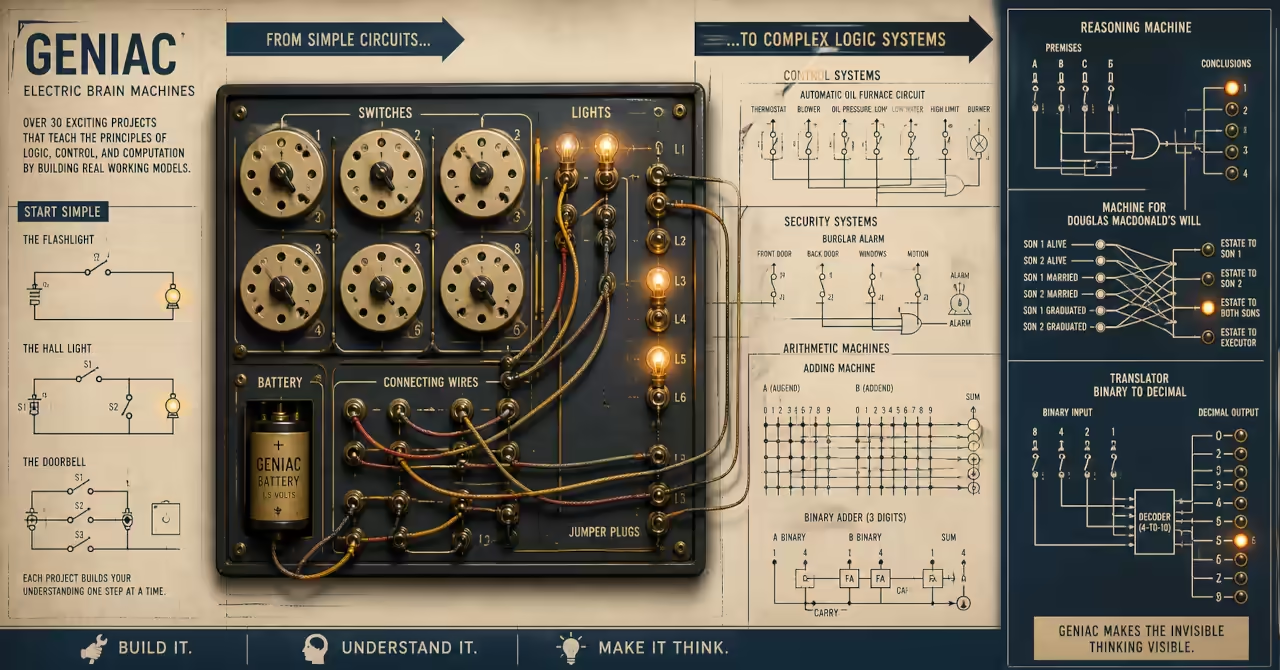
The GENIAC User Manual was not simply a collection of circuits. It was a project curriculum. Its small electric brain machines began with lamps, switches, and batteries, then steadily moved toward reasoning, arithmetic, games, coding, and symbolic translation. The point was not to hide computation inside a sealed device. The point was to make logic visible, physical, and available for experiment. For a broader view of how these machines fit together as a system of thought, see GENIAC Journal: Hands-On Analogue Computer Kit (1950s).
That is what makes the GENIAC project list so useful today. Each machine asks the builder to convert a problem into states, paths, conditions, and outputs. A light shines because a set of decisions has made a complete circuit. A warning appears because a condition has been met. A sum, comparison, or conclusion is not produced by magic, but by the arrangement of contacts and wires.
This is why the projects are best read in groups rather than as a random catalogue. The manual moves from household switching, to control systems, to puzzles, to arithmetic, to symbolic computing. This hands-on approach to learning through wiring and observation is examined in more detail in The GENIAC Approach: Learning with Analogue Circuits. It reminds us that good technical education should not begin with abstraction alone. It should begin with something a learner can build, test, break, repair, and understand.
This project list is presented as a structured learning system rather than a direct transcription of the manual, reflecting how understanding develops through practice.
On this page
Use this guide to navigate the project groups and key sections.
Tip: use this page as a reference when selecting projects by type or difficulty.
- Foundation Machines: Seeing Logic as a Circuit
- Control and Safety Machines: Modelling Real Systems
- Reasoning and Decision Machines: Wiring Human Rules
- Arithmetic Machines: Numbers as Switch Positions
- Games and Strategy Machines: Play as Computation
- Coding and Translation Machines: Changing One System into Another
- Key Insights for Experimenters
- Conclusion
- Difficulty Rating System
Foundation Machines: Seeing Logic as a Circuit
These first projects establish the basic relationship between switches, circuits, and observable outputs.
- The Flashlight
- The simplest GENIAC project establishes the basic relationship between switch, circuit, and output. Turning the switch closes the path and lights the bulb. Opening the switch breaks the path and turns the bulb off.
- Key analogue computing building blocks used: battery, wire, single switch, light bulb, open and closed circuit.
- Skill level required: ★ Beginner
- The Hall Light
- This project shows how one light can be controlled from two different locations. It introduces the idea that a circuit can change state when either of two switches is moved, making it a practical lesson in reversible switching logic.
- Key analogue computing building blocks used: two-position switches, shared output, alternate current paths, state inversion.
- Skill level required: ★ Beginner
- The Doorbell
- The doorbell machine models a system where any one of several inputs can trigger the same output. Pressing any door switch completes the circuit and causes the bell signal to appear.
- Key analogue computing building blocks used: parallel switching, multiple inputs, single output, OR logic.
- Skill level required: ★ Beginner
- The Porch Light
- The porch light extends the hall light idea by allowing one lamp to be controlled from three places. It introduces more complex switch sections and shows that practical control problems can require layered switching arrangements.
- Key analogue computing building blocks used: multi-position switching, multi-deck switch sections, alternate paths, shared lighting output.
- Skill level required: ★★ Intermediate
Control and Safety Machines: Modelling Real Systems
These projects model real-world systems where multiple conditions must be satisfied before an action can occur.
- The Burglar Alarm
- This project turns doors, windows, and lock switches into a simple security system. The alarm only becomes active when the system is armed, then any protected opening can trigger the warning output.
- Key analogue computing building blocks used: arming switches, sensor switches, conditional activation, multiple trigger points, alarm output.
- Skill level required: ★★ Intermediate
- The Automatic Oil Furnace Circuit
- The furnace circuit is one of the strongest examples of GENIAC as systems training. Heat is allowed only when the thermostat calls for it and all safety conditions are acceptable. Overpressure, low fuel, poor blower operation, low water, or excessive chimney heat can prevent operation.
- Key analogue computing building blocks used: thermostat input, safety interlocks, inhibit conditions, control output, AND and NOT logic.
- Skill level required: ★★ Intermediate
- Private Signaling Channels
- This project creates a small communication selector where each of three boys can signal either of the other two. It is a useful early example of routing: the switch setting determines which output channel receives the signal.
- Key analogue computing building blocks used: selector switches, named channels, routed outputs, one-to-one signalling.
- Skill level required: ★ Beginner
- Machine for a Spaceship's Airlock
- The airlock machine uses pressure, valve, and pump states to decide whether it is safe to open the inner door, the outer door, or neither door. It turns a science-fiction scenario into a serious lesson in safety logic and interlocking control, showing how physical systems can model real-world behaviour in the same way explored across the GENIAC Journal.
- Key analogue computing building blocks used: state switches, pressure condition, safety outputs, automatic lock logic, mutually exclusive conditions.
- Skill level required: ★★★ Advanced
Reasoning and Decision Machines: Wiring Human Rules
These machines translate rules and constraints into circuit logic, showing how decisions can be encoded and evaluated.
- The Fox, Hen, Corn, and Hired Man
- This machine models the classic river-crossing style problem as a warning system. The switches record where each character or object is located, and the lights show whether the arrangement is safe or dangerous.
- Key analogue computing building blocks used: position switches, paired conditions, danger detection, safety output, constraint logic.
- Skill level required: ★★ Intermediate
- The Machine for the Two Jealous Wives
- This project converts a socially awkward rule set into circuit logic. The machine checks who is in the canoe and signals danger when the agreed conditions are violated.
- Key analogue computing building blocks used: multi-person state switches, prohibited combinations, danger and safety outputs, compound conditional logic.
- Skill level required: ★★★ Advanced
- The Machine for Douglas Macdonald's Will
- This is one of the most revealing GENIAC projects because it turns a legal inheritance problem into a truth-table machine. The survival, marriage, and graduation status of two sons determine which output light shows the distribution of the estate.
- Key analogue computing building blocks used: six condition switches, many possible states, legal rule mapping, output classification, combinational logic.
- Skill level required: ★★★ Advanced
- Masculine-Feminine Testing Machine
- This period-piece project reflects the social assumptions of its time, but technically it remains useful as an example of scoring by switch selection. Answers to a set of questions are converted into a classification output.
- Key analogue computing building blocks used: questionnaire inputs, answer weighting, classification output, decision scoring.
- Skill level required: ★★ Intermediate
- Reasoning Machine
- The reasoning machine is among GENIAC’s most ambitious projects. It accepts logical statements about groups and produces a valid conclusion, or reports that no deduction can be made. This is not merely wiring; it is physical syllogistic reasoning, a direct expression of the “thinking machines” concept explored in How GENIAC Sparked the Electric Brain Revolution and Why Early Computers Reasoned in Syllogisms.
- Key analogue computing building blocks used: statement switches, inference mapping, conclusion lights, deductive logic, symbolic substitution.
- Skill level required: ★★★ Advanced
- Intelligence Testing Machine
- This machine scores a six-question test by counting correct answers. It demonstrates how individual true or false inputs can be accumulated into a result, making it an early physical example of automated assessment.
- Key analogue computing building blocks used: answer switches, binary correctness states, scoring outputs, counted result lights.
- Skill level required: ★★★ Advanced
Arithmetic Machines: Numbers as Switch Positions
These projects demonstrate how numerical relationships can be represented and resolved through circuit arrangements.
- Adding Machine
- The adding machine uses two number switches and output lamps for possible sums. It is a direct demonstration that arithmetic can be encoded as a set of physical pathways.
- Key analogue computing building blocks used: number switches, lookup wiring, sum outputs, combinational arithmetic.
- Skill level required: ★★ Intermediate
- Subtracting Machine
- The subtracting machine reuses the adding machine arrangement by relabelling positions and outputs. This is a powerful insight: sometimes a new machine is not new hardware, but a new interpretation of the same hardware.
- Key analogue computing building blocks used: relabelled switch positions, reused wiring, difference outputs, interpretation logic.
- Skill level required: ★★ Intermediate
- Multiplying Machine
- The multiplying machine maps pairs of switch settings to product lights. It shows multiplication as a table of possible relationships rather than as an invisible calculation.
- Key analogue computing building blocks used: paired number inputs, product lookup table, shared outputs, arithmetic mapping.
- Skill level required: ★★ Intermediate
- Dividing Machine
- The dividing machine extends the arithmetic idea into quotients, including special cases such as division by zero. It is valuable because it forces the builder to think about exceptional outcomes, not only normal answers.
- Key analogue computing building blocks used: dividend and divisor switches, quotient outputs, special-case outputs, table-based calculation.
- Skill level required: ★★ Intermediate
- Machine for Arithmetical Carrying
- This machine detects whether a carry is required in addition. It isolates one of the core problems in arithmetic computation and makes it visible as a simple carry or no-carry output.
- Key analogue computing building blocks used: threshold detection, carry output, no-carry output, arithmetic condition logic.
- Skill level required: ★★ Intermediate
- Comparing Machine
- The comparing machine reports whether one number is greater than, equal to, or less than another. It is a clean example of classification by relationship rather than calculation by result.
- Key analogue computing building blocks used: paired number inputs, comparison states, greater/equal/less outputs, relation logic.
- Skill level required: ★★ Intermediate
Games and Strategy Machines: Play as Computation
These projects show how rules, choices, and outcomes can be modelled as structured interactions within a circuit.
- The Uranium Shipment and the Space Pirates
- This project models a strategic conflict between a shipment commander and pirates. Routes, disguises, attack choices, and order of travel combine to determine the outcome. It is a compact lesson in scenario modelling.
- Key analogue computing building blocks used: scenario switches, route selection, conflict outcomes, conditional branching, strategy logic.
- Skill level required: ★★★ Advanced
- Machine to Play Nim
- The Nim machine responds to a human player's move by signalling its own move. It demonstrates that a game strategy can be embodied in a wiring pattern, not merely described as a rule.
- Key analogue computing building blocks used: pile-state switches, turn switch, move lights, game-state logic, strategy table.
- Skill level required: ★★★ Advanced
- Machine to Play Tit-Tat-Toe
- This machine plays tic-tac-toe with the human player, using switches to record the last machine move and the current player move. It is a striking example of early game-playing logic made physical.
- Key analogue computing building blocks used: move-state switches, position encoding, response selection, win indication, game strategy wiring.
- Skill level required: ★★★ Advanced
Coding and Translation Machines: Changing One System into Another
These projects show how information can be encoded, transformed, and recovered by mapping one set of symbols or states into another through structured circuit paths.
- Special Combination Lock
- The special combination lock opens only when three switches are set to a fixed three-digit code. It is a simple but effective demonstration of matching logic.
- Key analogue computing building blocks used: digit switches, fixed code path, match condition, open output.
- Skill level required: ★ Beginner
- General Combination Lock
- The general combination lock extends the idea by allowing a flexible relationship between one set of switch positions and another. It moves from a fixed secret to a more general matching mechanism.
- Key analogue computing building blocks used: paired digit switches, adjustable combination logic, matching condition, open output.
- Skill level required: ★★ Intermediate
- Secret Coder
- The secret coder converts plain text into cipher text by wiring letter relationships through paired switches. It shows that encoding is a physical transformation from one symbol system to another.
- Key analogue computing building blocks used: alphabet switches, paired substitutions, match lamp, cipher mapping.
- Skill level required: ★★ Intermediate
- Secret Decoder
- The decoder uses the same structure in reverse, demonstrating that a well-designed transformation can be reversible. This is a strong lesson in symmetry, mapping, and information recovery.
- Key analogue computing building blocks used: reversible substitution, paired switch mapping, signal matching, cipher recovery.
- Skill level required: ★★ Intermediate
- Translator from Binary to Decimal
- This machine converts a four-digit binary number into its decimal equivalent. It makes the structure of binary notation visible by forcing each digit position to become a physical input.
- Key analogue computing building blocks used: binary digit switches, decimal test switch, match light, positional notation.
- Skill level required: ★★★ Advanced
- Translator from Decimal to Binary
- The decimal-to-binary translator performs the reverse task, using lamps to show the binary digits for a selected decimal number. It turns number representation into an observable machine state.
- Key analogue computing building blocks used: decimal input switch, binary output lamps, positional encoding, number translation.
- Skill level required: ★★ Intermediate
- Binary Adding Machine
- The binary adding machine accepts two three-digit binary numbers and displays their sum using output lamps. It brings the learner close to the logic of real digital computers while still using physical switches and bulbs.
- Key analogue computing building blocks used: binary inputs, output digit lamps, carry logic, binary arithmetic.
- Skill level required: ★★★ Advanced
- Binary Multiplying Machine
- The binary multiplying machine accepts two two-digit binary numbers and displays their product. It shows why binary representation became so important in automatic computers: the states are simple, but their combinations are powerful.
- Key analogue computing building blocks used: binary switches, product lamps, digit positions, binary multiplication logic.
- Skill level required: ★★★ Advanced
- Binary Comparison Machine
- The binary comparison machine reports whether one binary number is greater than, equal to, or less than another. It expands the earlier decimal comparison idea into a more computer-like representation.
- Key analogue computing building blocks used: binary number inputs, comparison output lamps, greater/equal/less logic, positional comparison.
- Skill level required: ★★★ Advanced
- Two-Out-Of-Five Code Translator
- This project introduces a coded decimal representation where each digit is expressed by selecting two out of five possible outputs. It is especially interesting because it connects computing with reliability: invalid patterns can reveal equipment failure.
- Key analogue computing building blocks used: coded outputs, two-out-of-five selection, decimal digit input, error-aware representation.
- Skill level required: ★★★ Advanced
Key Insights for Experimenters
The project list is a curriculum, not a catalogue
The GENIAC manual begins with familiar household circuits and ends with binary arithmetic, symbolic reasoning, code translation, and game strategy, a progression that is brought together in the broader system view presented in the GENIAC Journal. That progression matters. A learner is not asked to believe in computation as an abstract idea. They are invited to build it in layers. Each project adds a new kind of relationship: switching, selecting, comparing, inhibiting, scoring, translating, or reasoning. This is the sort of training modern technical education often forgets.
Physical models make abstract logic easier to trust
When a GENIAC lamp lights, the result is not hidden inside software. The learner can trace the path, inspect the switch position, and find the reason. That physical traceability is a powerful teaching device. Analogue and electromechanical models slow the learner down in the best possible way. They make thinking visible. They make error visible. They reward patience, observation, and diagnosis.
The best kits create designers, not consumers
The GENIAC kit was not limited to copying a fixed set of machines. Its switches, wires, bulbs, and labels were general-purpose materials. Once a builder understood the pattern, they could invent new machines. That is the deeper lesson. A good educational kit should not merely demonstrate someone else's design. It should give the learner enough confidence to create their own.
Difficulty Rating System
The difficulty ratings used in this article are editorial assessments, not ratings supplied in the original GENIAC manual. They are included to help modern readers understand how demanding each project may be to build, trace, and troubleshoot.
Each rating considers three factors: the number of switches and circuit paths involved, the complexity of the logic being modelled, and the level of reasoning required to understand why the output appears. A simple circuit with one clear cause and effect is rated as ★ Beginner. A project with multiple inputs, conditions, or reused circuit paths is rated as ★★ Intermediate. A machine involving symbolic reasoning, game strategy, binary arithmetic, or many possible states is rated as ★★★ Advanced.
- ★ Beginner
- A project suited to basic orientation. The circuit demonstrates a clear relationship between switch position, current path, and visible output.
- ★★ Intermediate
- A project requiring more careful wiring, several conditions, or a stronger understanding of how switch positions combine to produce an outcome.
- ★★★ Advanced
- A project involving complex state combinations, symbolic rules, arithmetic, strategy, or reasoning logic. These projects require more patience to build and more discipline to diagnose.
These ratings provide a consistent framework for comparing projects and can be used to plan a progression from simple circuits to advanced reasoning machines.
Conclusion
The project work in the GENIAC kit shows why hands-on analogue computing still matters. These machines are simple, but they are not trivial. They teach that a problem can be analysed into states, choices, constraints, and outputs. They show that arithmetic, reasoning, control, communication, and game strategy can all be expressed through physical arrangements of switches and lights.
For modern readers, the value of GENIAC is not nostalgia alone. It is a practical invitation. The projects in this list are not meant to remain descriptions on a page. They are meant to be built, tested, and understood through direct interaction. Each circuit becomes clearer when you trace the path, set the switches, and observe the result.
If you are considering taking that step, the next place to go is the GENIAC Parts List. It outlines the components required to assemble these machines and turns the project list into something actionable. Taken together, the projects and the parts form a complete system: choose a machine, gather the components, and begin building. That is where the real understanding starts.
Featured Product
Analogue Computer Series 001 T-Shirt
This t-shirt draws inspiration from early analogue computer kits of the mid-20th century, where switches, wires, and circuits formed machines that could reason and calculate. Like the GENIAC kit explored in this article, it reflects a hands-on approach to understanding logic through physical systems.
Disclosure: this featured product is sold through an external Zazzle store associated with philreichert.org.

Exhibit Notes
This article is based on a close reading of the GENIAC user manual rather than direct ownership of the kit. The manual is treated here as both technical documentation and educational evidence: a record of how computation was explained, staged, and made practical for a mid-century experimenter.
What stands out is the structure of the projects. They do not simply demonstrate circuits. They build a pathway from simple switching to control logic, reasoning, arithmetic, games, and code translation. That progression is important because it shows how the manual trained the reader to think in systems.
My interest is in what this tells us now. GENIAC shows that physical models can make abstract logic visible. Even without assembling the kit, the manual reveals a disciplined approach to learning: define the problem, build the path, test the output, and let the machine expose the quality of the reasoning.
Glossary
- Electric Brain
- A 1950s term used to describe early computing machines capable of reasoning or calculation. It reflects a period when computation was understood through physical circuits rather than abstract software.
- Multiple Switch
- A mechanical switching device with several independent sections, allowing multiple circuits to change state at once. In modern terms, this relates to multi-pole switches or coordinated logic inputs.
- Deck (Switch Deck)
- A single electrically independent layer within a multi-section switch. Each deck controls its own circuit path, enabling one physical control to influence multiple logical conditions.
- Transfer Contact
- The central connection point in a switch that routes current between different outputs depending on position. It represents a physical implementation of conditional logic.
- Binary Notation
- A number system using only two digits, 0 and 1, widely used in computing. In GENIAC, binary was demonstrated using physical switch states and lamp outputs rather than electronic memory.
- Circuit Diagram
- A symbolic representation of electrical connections showing how components are logically arranged. In the GENIAC era, diagrams focused on functional relationships rather than physical layout.
Frequently asked questions
Was the GENIAC manual just a list of circuit projects?
No. The project list works as a structured curriculum. It begins with simple switching circuits, then develops into control systems, reasoning machines, arithmetic devices, games, and code translators.
Why were GENIAC projects useful for learning computing?
GENIAC made computation physical. Switches, wires, bulbs, and circuit paths allowed learners to see how decisions, conditions, calculations, and outputs were produced.
What kinds of machines could be built from the GENIAC kit?
The manual included household circuits, alarms, signalling systems, legal and logical reasoning machines, arithmetic machines, binary translators, game-playing machines, and code systems.
What is the main lesson for modern experimenters?
The main lesson is that physical models still matter. Building a working circuit can teach logic, systems thinking, diagnosis, and invention in ways that theory alone often cannot.
Connected Threads
- GENIAC Kit Parts List and Modern Rebuild Guide – Included to show how the same parts are recombined into increasingly complex machines and concepts.
-
Why Early Computers Reasoned in Syllogisms
Explores how mid-century computing culture framed machine reasoning through symbolic logic and syllogisms, linking GENIAC circuits to a period when thought itself appeared to glow through visible electrical systems.
Related articles…

References
- Berkeley, Edmund C., Geniacs: Simple Electric Brain Machines and How to Make Them, Berkeley Enterprises, Inc., 1955. Used as the primary source for the project list, terminology, and editorial assessment in this article.
Disclosure
This page presents a curated exploration of the GENIAC analogue computer kit and its associated materials. Content reflects the author’s interpretation of historical sources, including instructional manuals, advertisements, and related artefacts. The GENIAC system is discussed as an educational and conceptual model for understanding logic, circuits, and early computing ideas, rather than as a complete or authoritative account of computing history. References to “thinking machines” and reasoning systems follow the language and framing of the original material and are included for historical context. Readers seeking formal technical, historical, or academic treatment of computing should consult primary literature, scholarly sources, and specialist texts.