What to Check in Vintage C64 MIDI Interfaces Before You Buy
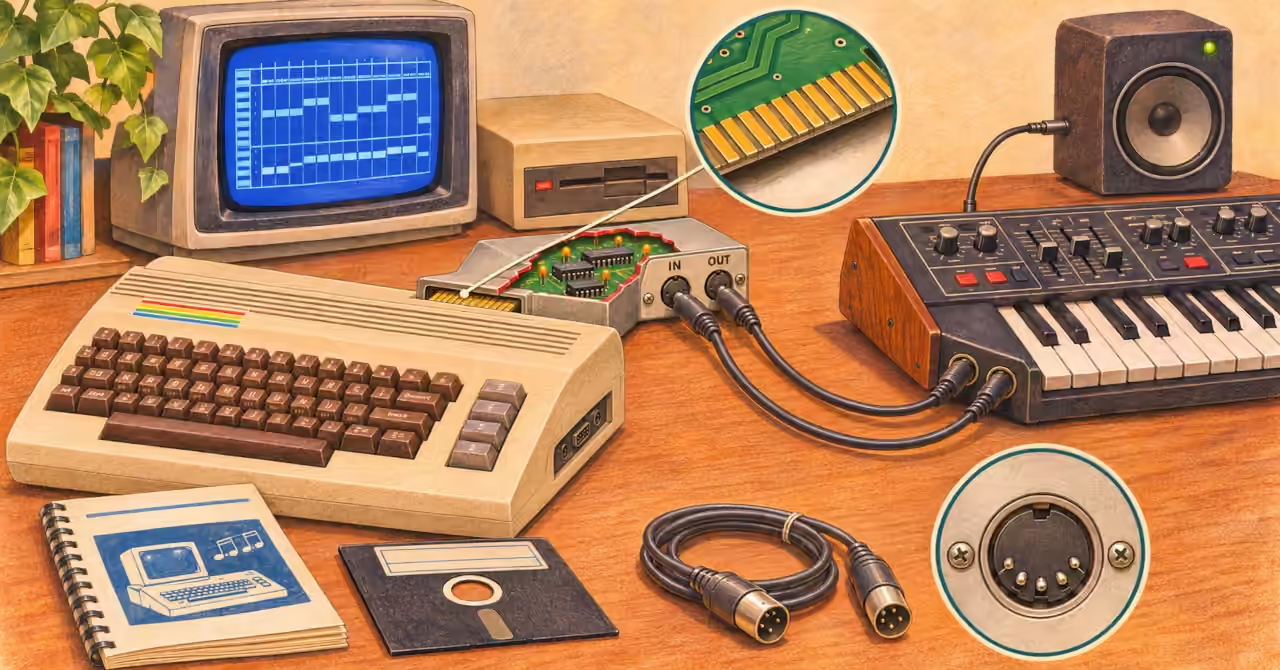
Buy a working system, not just a box
A small box with a Commodore connector and MIDI sockets promises an appealing new job for an old computer. But before buying, ask what could stop it working: missing software, damaged contacts, the wrong cables or a seller’s test that proves very little.
The C64, interface, program and instrument must work together. Start with the C64 MIDI workstation overview if you want the studio picture. Here, the task is choosing a particular interface you can put to use.
What the interface actually does
The C64 has no built-in MIDI socket. An interface lets it exchange musical instructions with an external instrument. The synthesiser makes the sound, and its audio output must reach speakers or headphones separately. Our SID versus MIDI comparison explains how this differs from using the computer’s own sound chip.
Traditional DIN MIDI sends 31,250 bits per second. Each byte travels with start and stop bits, taking 320 microseconds—less than a thousandth of a second. That fixed transmission speed is separate from messages controlling musical tempo. See the MIDI technical history for the details.
Chips called UARTs and ACIAs handle serial communication: data sent one bit after another. They reduce the computer’s workload, but the software still has to collect incoming data and send notes at the right time.
Australia’s ETI 613 project, published in November 1987, used a UART in a user-port interface. It shows how dedicated hardware could help the C64 handle MIDI while leaving it free for other tasks.
Think of the interface as a translator. It handles the connection between two machines, while the program decides what to send. A test should therefore show the whole conversation, not just a light coming on.
Identify the model before counting sockets
Ask for clear photographs of the label, computer connector and socket markings. Record the maker, model and board revision. “C64 MIDI interface” does not tell you which programs will work with it.
Different models used different connections on the C64’s rear panel. The September 1984 64’er survey describes Steinberg Research’s small user-port board with one MIDI input and two outputs. Passport’s March 1985 manual places its MH-01C in the cartridge expansion slot. Do not assume every model from either maker uses the same connection.
Extra sockets need checking too. Two MIDI outputs might send the same data rather than serve as separate ports. A five-pin DIN socket could carry drum-sync signals instead of MIDI. Read the labels and manual before plugging anything in.
Find the software before buying
Choose a program that does the job you want, then check which interfaces its version supports. Software may expect chips at particular hardware addresses or rely on specific timing features. A board can fit the computer while remaining unusable with your chosen program.
Ask the seller to name the program, version and interface setting used in the test. The 64’er survey describes both Steinberg’s 16-track recorder and a Jellinghaus DX7/DX9 sound editor. Recording notes and transferring synthesiser sounds are different tasks; success with one does not prove the other works.
Check that you can obtain the software legitimately and load it from your disk drive or replacement storage device. Finding an archived disk image does not, by itself, settle permission to use it or show that it will run on your setup.
Keep a copy of the correct manual with the software. It gives you a way to check settings and connections later, especially if you change instruments or return to the system after a long break.
Inspect the connections and condition
Look for corroded contacts, cracked sockets, loose cables, damaged parts and repairs the seller can explain. Where safe, request a board photograph. Check for copper tracks lifting from the board and unsupported parts that could move or break. An exposed board needs careful handling; a case alone proves little about its condition.
Ask whether the leads are original or replacements. A missing special cable can matter more than a missing box. If external power is required, confirm the specified supply before connecting anything. Do not try an adapter simply because its plug fits.
Switch the computer off before fitting or removing the interface, following its manual. Have doubtful wiring or corrosion assessed first. Replace components such as capacitors according to their condition and circuit requirements, rather than age alone.
Ask for evidence you can use
| Check | Ask the seller for | What it tells you |
|---|---|---|
| Identity | Model labels and connector photographs. | Which manual and software to check. |
| Software | Program name, version and interface setting. | Which combination was tested. |
| MIDI input | A phrase recorded from a working keyboard. | Whether the program receives notes. |
| MIDI output | Playback through an external instrument. | Whether it sends usable notes. |
| Condition | Clear photographs and details of repairs. | What may need further attention. |
| Completeness | A list of supplied manuals, disks and leads. | What you still need to find. |
If the seller cannot test the unit, ask what they do know: when it last worked, what equipment was used and whether anything has changed. Treat an honest “untested” description as uncertainty to allow for, rather than proof of failure.
A loaded screen does not prove recording works. Hearing a tune does not prove MIDI input works. Ask what was connected and which direction the data travelled.
Try a short musical test
Use a known-working keyboard and cables, then test the features you need:
- Connect both directions. Keyboard MIDI Out goes to interface MIDI In; interface MIDI Out goes to keyboard MIDI In. Set matching channels and listen through the keyboard’s audio output.
- Check for doubled notes. A keyboard may play its own sound while the sequencer sends the same note back. If using the sequencer’s MIDI echo, turn Local Control off on keyboards that support it. Otherwise disable echo and test recording and playback separately. Local Control links the keys to the keyboard’s own sound engine.
- Record and replay a phrase. Include short notes, held notes and a chord. Check that each starts and stops correctly. Disconnect the keyboard’s MIDI Out during playback if needed to isolate the recorded part.
- Add expression and more tracks. Try velocity, pitch bend, modulation and aftertouch where supported. Play a denser passage and listen for missing or stuck notes. If faults appear, check software settings, cables and the instrument as well as the interface.
- Save, reload and replay. Prove that the session survives closing and reopening. Test external clock and start/stop control separately if your setup needs them.
For sound editing, also test the supported System Exclusive (SysEx) transfer, which carries device-specific data such as patches. Back up sounds first and use data you can afford to replace.
When buying remotely, ask for one continuous demonstration showing the item, software settings and musical result. It gives stronger evidence than separate photographs.
Decide what you are buying
Rarity is not a performance feature.
A demonstrated system with available software is the strongest starting point for making music. An untested board with missing leads is a restoration project: allow for extra cost, work and uncertainty. A rare interface without usable software may still make a fine collectible, but buy it for its history.
The pleasure lies in bringing the partnership back to life: computer, interface, software and instrument. Choose the example that suits your purpose and has evidence to match. The box may be older than the keyboard. It should not be older than your patience.
Featured Product
Analogue Computer Series 001 T-Shirt
Enjoy seeing the circuitry behind the music? Take that curiosity beyond the studio with the Analogue Computer Series 001 T-Shirt. Its electric brains, switches and glowing indicators celebrate the visual charm of early computing — wearable history for people who always want to look inside the box.
Disclosure: this is a commercial product link to an external Zazzle store associated with philreichert.org. Purchases are handled by Zazzle.

Writer’s Notes
Reader Guide
The following material expands on the terminology, historical context, technical concepts, and related reading connected to this article.
Glossary
- MIDI interface
- The hardware linking the C64 to MIDI-equipped instruments. It exchanges musical instructions rather than audio, so a working connection does not replace the synthesiser’s audio output. See MIDI Basics for the wider background.
- UART / ACIA
- Universal Asynchronous Receiver/Transmitter and Asynchronous Communications Interface Adapter: chips that handle serial communication. In a MIDI interface, they help exchange bytes without making the C64 manage every individual bit. Their presence alone does not guarantee software compatibility or reliable sequencing.
- Cartridge expansion port / user port
- Two different connections on the C64’s rear panel, both used by vintage MIDI designs. Passport’s MH-01C uses the cartridge expansion port; the early Steinberg interface discussed here uses the user port. Identify the exact model before choosing software or connecting hardware.
- Interface compatibility
- Whether a particular program can operate a particular interface. Software may expect specific hardware addresses, interrupts or timers. A board that physically fits the C64 can still be unsupported by your chosen sequencer.
- MIDI sequencer
- Software that records, edits and plays back musical events such as notes and controller changes. For a buying test, check recording, playback, saving and reloading together. Explore the period possibilities in Could a Commodore 64 Be a Music Workstation in 1986?
- MIDI Out / MIDI Thru
- MIDI Out sends data from a device; MIDI Thru forwards data received at MIDI In. Two output sockets do not necessarily provide two independently controlled data streams—check the interface documentation.
- MIDI Clock / drum sync
- Ways of keeping musical equipment in time. MIDI Clock uses MIDI messages; a separate drum-sync socket may use a different electrical signal. A five-pin DIN connector is not proof that a socket carries MIDI.
- System Exclusive (SysEx)
- Device-specific MIDI messages often used to transfer synthesiser patches or sound banks. Successfully playing notes does not prove that an interface and program can complete these transfers; test the intended editor separately using backed-up data.
- Velocity / aftertouch
- Velocity describes how quickly a key is struck; aftertouch describes pressure applied after pressing it. These provide useful expression tests, but only when the keyboard generates the data and the software supports recording it.
- Edge connector
- The exposed conductive contacts along a circuit board’s edge, used to connect it to the computer. Inspect them for contamination, corrosion and damage, and fit or remove the interface with power switched off.
Frequently asked questions
Will any C64 MIDI interface work with any sequencer?
Do not assume so. Verify the exact interface model and software version, then demonstrate that combination. Sharing a computer port or MIDI connector does not establish software compatibility.
Does a MIDI interface make the C64 sound like a synthesiser?
An ordinary MIDI interface exchanges instructions with an external instrument; it does not supply that instrument’s sound. Monitor the receiving instrument’s audio separately.
Are two MIDI outputs better than one?
Only if their documented behaviour serves your setup. Two sockets may carry the same data rather than provide independently controlled ports.
What should a tested listing demonstrate?
For sequencing, ask for MIDI input recording, playback through an external instrument, and save-and-reload operation using named software. Test patch transfers or synchronisation separately if you need those features.
Related articles…


References and further reading
Manufacturer instructions and contemporary publications support the historical examples. The buyer’s checklist is an editorial synthesis, rather than a claim that every vintage unit has the faults listed.
- Passport Designs, MIDI Interface Card User Manual & Technical Notes, first edition, March 1985. Printed pp. 3, 7 and 21 identify MH-01C, C64 installation and hardware addresses. Other sections describe Apple models: do not transfer their features without checking.
- “Hard and Soft: eine kleine Marktübersicht”, 64’er, September 1984, pp. 58–60. Contemporary German-language survey of C64 interfaces and programs, including Steinberg and Jellinghaus.
- David Ellis, “Passport MIDI/4 Software”, Electronics & Music Maker, September 1984. A contemporary review of the Apple version
- Mark Turnham, “ETI 613 MIDI Interface for C64”, Electronics Today International, Australian edition, November 1987, beginning p. 94. Issue scan; searchable text mirror. The publisher’s ETI project index also identifies project 613 and its issue.
- Hideki Izuchi, Systematized Survey of MIDI and Related Technologies, section 4.3, hardware. Supports the classic serial format and byte timing.
Disclosure
This article was prepared using a combination of original research, published sources, archival material, and digital research and writing tools, including the use of large language model tools. Sources are referenced where appropriate. The author reviews and edits the article and may make ongoing editorial updates. Any commercial relationships, affiliate links, sponsorships, or other material interests relevant to the article are disclosed separately where applicable.