Could a Commodore 64 Be a Music Workstation in 1986?
Introduction
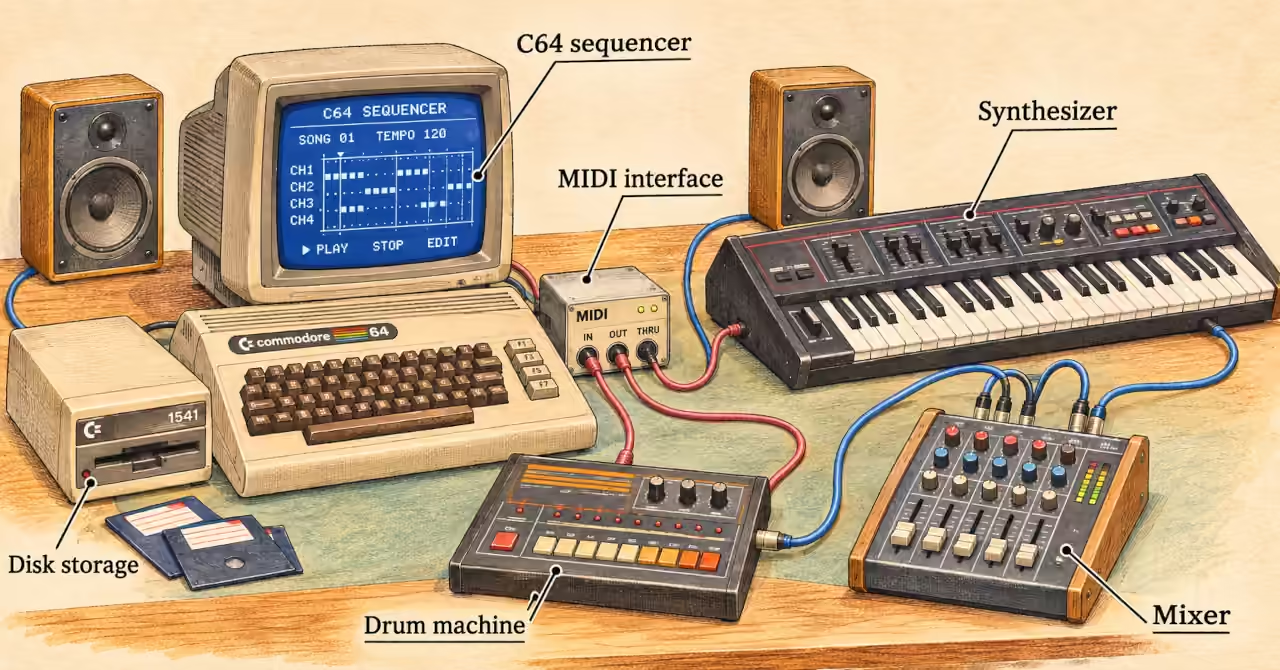
Picture a Commodore 64 beside a synthesizer, a drum machine and a small mixer. It is the same beige computer that runs games in the next room. Here, it remembers what the musician plays, helps fix mistakes and tells the other instruments when to join in. By 1986, the right software and a MIDI interface could turn a home computer into the centre of a music setup.
In Making Music With a Commodore 64: The Hardware You Need, we explore the equipment that connects it all. This article follows what happens next: turning a short musical idea into something you can change, arrange, save and play again.
Period reviews show that the C64 could do those jobs. But the computer was only part of the workstation. The instruments made the sounds, and the musician had to keep the whole system working.
What makes it a music workstation?
For this article, a music workstation is a setup that helps you record musical ideas, edit them, build an arrangement and return to your work later. This is a practical test, rather than a claim that every reviewer in 1986 used the term that way.
Imagine recording a bassline with one wrong note. If you can correct that note, repeat the phrase under another part and save the result, the computer is helping you compose. You can improve the idea without having to perform everything again.
SID makes the sound
The C64 already contained a synthesizer: the SID chip. It had three voices, with controls for pitch, waveform, volume envelopes and filtering. These shaped the notes and how they sounded. [1] Musicians could use existing SID composition software or write programs of their own.
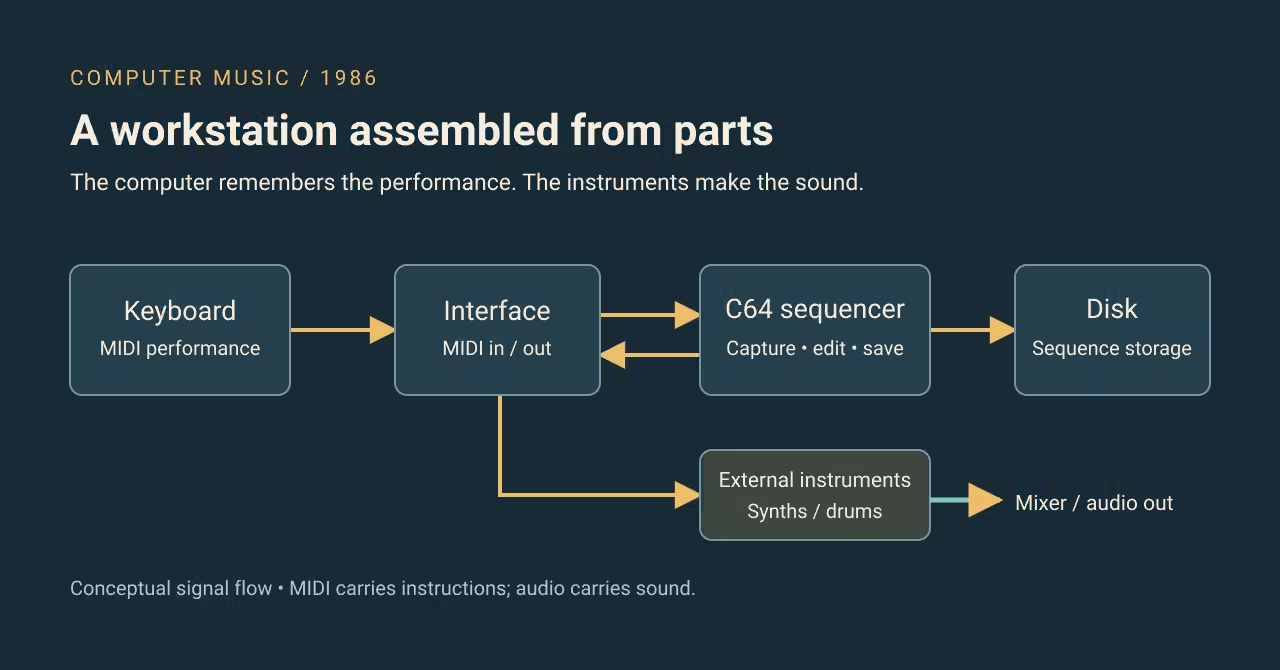
MIDI gave the computer a different job. Instead of making the sound, it sent instructions to an outside instrument: play this note, at this time, with this strength. The instrument produced the audio. [2]
That distinction opened up a larger setup. A C64 sequencer could direct external instruments without being limited to SID's three voices. How many notes could sound together depended on the connected instruments and their settings.
The diagram below separates those jobs. MIDI connections carry musical instructions. Audio connections carry sound from the instruments to the mixer, where their levels can be balanced. It is a guide to the roles, rather than a wiring plan for every interface.
Supertrack: composing and editing
Mark Jenkins's May 1986 Sound On Sound review describes C-Lab Supertrack for the C64. It offered 16 sequencing tracks, recording as you played, note-by-note entry, editing, pattern chaining and disk storage. [3]
Those features made a useful working cycle possible. Play a phrase, correct it, join it to other passages and save the result. Sixteen tracks meant places to organise musical parts, not sixteen sound generators inside the C64.
Supertrack also offered a ghost track: another version of a track that reused its notes with different playback settings. [3] Think of it as trying a different treatment of a phrase while keeping the original available. This saved memory and made experiments easier to undo.
There were limits. The review reports room for about 8,500 notes, some setting changes stopping playback, and timing connections that depended on the interface. The editor did not handle aftertouch: messages from pressure applied to a key after pressing it. [3] Software capability and the equipment around it both mattered.
Trackstar: an easier starting point
Steinberg Trackstar took a simpler approach. Ian Waugh's October 1986 Electronics & Music Maker review describes a beginner's package costing £70 in Britain, including software and an MMI interface with one MIDI input and two outputs. [4]
Its screen looked like a tape recorder, complete with moving reels. Familiar record and playback controls helped explain an unfamiliar way of making music. You could record while playing or enter notes one at a time.
The eight-track description needed a closer look: four tracks handled musical parts, while four played single-note percussion parts. [4] It was an introduction to sequencing, with limits worth understanding before planning an arrangement.
The price also covered only part of the setup. You still needed the computer, instruments and a way to hear them. A low-cost software package could open the door without paying for everything beyond it.
Affiliate disclosure: the eBay placement below may earn this website a commission from qualifying purchases.
From a bassline to an arrangement
Here is an example of how a session could work with software such as Supertrack. It is an illustration of the process, not a record of a particular musician's session.
- Get one sound working. Load the sequencer and connect the interface and synthesizer. Match the sending and receiving MIDI channels. Play a note and check that you can hear the synth before adding more equipment.
- Record a short bassline. Choose a bass sound and play a short phrase. If playing to the beat is difficult, enter the notes one at a time using step-time recording.
- Fix one thing. Correct a wrong pitch in the editor. Listen again before making more changes, so you can hear whether the correction helped.
- Build around the phrase. Repeat it, add a second musical part and bring in a drum pattern. Check which instrument receives each part; two parts sent to the same destination may not behave as intended.
- Save the setup as well as the notes. Save the sequence to disk. Write down the tempo, MIDI channels, instrument sounds and important settings needed to play it again.
That last step is easy to overlook. Saving a sequence preserves instructions, not a recording of the sound. Tomorrow, the notes may be correct but the bassline may play with the wrong patch selected. Keeping a simple setup sheet makes the work easier to recover.
If playback is silent, trace the path in order. Is the sequencer playing? Is the interface connected? Is the instrument listening on the right channel? Can you hear that instrument through the mixer? Checking one link at a time is easier than changing several settings and hoping the music returns.
Give each saved version a clear name, and keep the earlier one before trying a major change. A simple note such as “bass sound 12, drums on channel 2” can be more useful next week than relying on memory alone.
To preserve the finished performance as audio, you also need a recording stage. The sequencer remembers the arrangement; it does not automatically record everything coming through the mixer.
A workstation you assembled rather than received
The C64 could support a music workstation in 1986 because suitable software let musicians record, edit, arrange and save musical events while directing other instruments. The reviews demonstrate those abilities. They do not tell us how common such setups were or how comfortable every musician found them.
The C64 could hold an arrangement together, while the musician held the system together. But where did the music's character come from: the computer's own sound chip or the instruments it controlled? Continue with SID vs MIDI: Two Ways Computers Make Music to explore why that choice changed both the sound and the way musicians worked.
Featured Product
Analogue Computer Series 001 T-Shirt
If SID represents the computer as an instrument, go back another generation to computers you could see, trace and understand. The Analogue Computer Series 001 T-Shirt celebrates electric brains, logic circuits, switches and glowing indicators — wearable computing history for those who appreciate the machinery behind the magic.
Disclosure: this is a commercial product link to an external Zazzle store associated with philreichert.org. Purchases are handled by Zazzle.

Writer's Notes
Reader Guide
The following material expands on the terminology, historical context, technical concepts, and related reading connected to this article.
Glossary
- Sequencer
- A tool that stores and plays back a timed series of musical events.
- Real-time entry
- Recording musical events as the performer plays them.
- Step-time entry
- Entering notes and durations separately, without having to play the phrase at performance speed.
- Quantisation
- Adjusting event timing towards a selected rhythmic grid.
- Polyphony
- The ability to sound more than one note at a time.
- MIDI channel
- A logical address that helps route messages to the intended receiving part or instrument.
- Patch / program change
- A patch is an instrument sound setting. A MIDI program-change message requests a sound selection; its result depends on the receiving instrument.
- ADSR envelope
- Attack, decay, sustain and release: stages used to describe how a sound’s level changes over time.
Commodore 64 music workstation FAQ
What equipment did a Commodore 64 need to function as a MIDI music workstation in 1986?
A Commodore 64 needed suitable sequencing software, a compatible MIDI interface and external MIDI instruments, such as synthesizers or drum machines. A disk drive provided storage for compositions, while the instruments’ audio outputs required amplification or connection to a mixer. Together, these components formed a music workstation for recording, editing and replaying musical instructions.
Did Commodore 64 MIDI sequencers use the internal SID chip to produce sound?
Not necessarily. The SID chip generated sound inside the Commodore 64, while MIDI sequencers could send musical instructions to external synthesizers and drum machines. Those instruments produced their own audio, so a MIDI arrangement was not restricted to the SID chip’s three voices.
Does saving a Commodore 64 MIDI sequence preserve the instruments’ exact sounds?
Saving a MIDI sequence preserves musical instructions rather than an audio recording. Reproducing the same sound also requires the appropriate instruments, sound patches and settings. A sequence may include program-change messages, but these select sounds on the receiving instrument rather than storing the sounds themselves.
How did a Commodore 64 MIDI workstation differ from a modern digital audio workstation?
A Commodore 64 MIDI workstation typically recorded and edited musical instructions that controlled external instruments. A modern digital audio workstation can also record audio, host software instruments, apply effects and mix a complete production within the computer. The C64 could organise an arrangement, but the systems used for MIDI sequencing in 1986 relied on separate equipment to generate, mix and record its audio.
Related articles…


References and further reading
Period reviews establish product capabilities; the workstation interpretation is the argument developed here. Sources checked 14 November 2026.
- Commodore. Commodore 64 User Manual, Chapter 8: Making Sound and Music. Manufacturer documentation; SID architecture and controls.
- The MIDI Association. About MIDI—Part 1: Overview. Technical background distinguishing performance messages from audio; not evidence for individual 1986 products.
- Mark Jenkins. C-Lab Supertrack. Sound On Sound, May 1986. Contemporary C64 review; sequencing, editing, storage and interface-dependent synchronisation.
- Ian Waugh. Trackstar. Electronics & Music Maker, October 1986. Contemporary C64 review; package contents, UK price and track restrictions.
- Stefan Lipson. The Music Studio for Amiga and Atari ST. COMPUTE!, issue 78, November 1986, page 70. Used only to establish the review’s platform scope.
Disclosure
This article was developed using archival reviews, technical documentation and AI-assisted research and writing tools. It presents a historical interpretation rather than a hands-on evaluation of the equipment or software discussed. The illustrative workflow and AI-generated hero image are conceptual representations, not records of a particular 1986 studio. Product capabilities varied by software version, interface and connected equipment; consult the original documentation when assembling or operating a vintage system.