MIDI Basics - A Retro Tech Deep Dive
Updated 8 December 2025
Introduction
MIDI arrived in the early 1980s with a simple goal: give electronic instruments a common way to communicate. What emerged was far more powerful. Instead of transmitting audio, MIDI sends instructions — which notes to play, how hard to strike them, how to bend a pitch, open a filter, trigger a drum, or even move a stage light. It became the glue that held entire studios together, letting synths, drum machines, sequencers, samplers, and computers all speak the same musical language.
Four decades later, this modest 5-pin protocol still shapes how music is created. It’s in DAWs, virtual instruments, hardware racks, lighting consoles, art installations, and now even web browsers. Understanding MIDI isn’t just a technical exercise — it’s a window into how electronic music evolved and how creative tools continue to talk to each other behind the scenes.
When I first started digging deeper into MIDI, I kept circling back to the same place: the MIDI Association. It’s effectively the town square of the MIDI world — part library, part museum, part meeting hall. Signing up is free, and once inside you get access to the original specifications, technical notes, historical documents, and a surprisingly welcoming community of enthusiasts and engineers. My own journey began with their “What is MIDI?” booklet, a gentle introduction that helped connect the dots between the gear I’d used for years and the protocol quietly powering it.

Computer Chronicles - 1986 MIDI Music Special
Notice: Video is served by Internet Archive. Please refer to the Internet Archive copyright and privacy policies.
MIDI Notebook
openSUSE Tumbleweed
Embarking on a quest for the perfect MIDI file player felt endless until I stumbled upon the command-line treasure PMIDI. My latest find, however, is the stellar Drumstick MIDI application, a gem for Linux aficionados, easily obtainable via openSUSE's software repositories.
OpenMPT (Windows)
OpenMPT is probably best known for its ability to play Amiga MOD-style music — which is how I first discovered it. Beyond this obvious use, OpenMPT is also a powerful sequencer and is SoundFont enabled. I find it very easy to load MIDI tracks and start hacking away. The Tree View is a work of pure genius.

SendMIDI
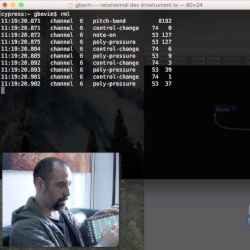
SendMIDI is a multi-platform command-line tool that makes it very easy to send MIDI messages to your hardware from the computer. Built with the JUCE library, it’s designed for sending CC, NRPN, program changes, and other messages to your MIDI-enabled equipment.
I haven't had much of a chance to give this a whirl yet, but I see it as the perfect solution for sending macro setup commands to my Yamaha Motif-Rack. Imagine large on-screen hot buttons that fire off prepared MIDI strings to change effects, delays, and other details on the fly. Tools like this could easily become part of a more automated, performance-friendly MIDI workflow.
For full details and downloads, visit the SendMIDI project site.
Sound Fonts .sf2
SoundFonts were once promoted as the electronic instrument equivalent of standard text fonts — a portable way to package and share complete instrument sets. They have largely fallen out of fashion in mainstream production, which makes them all the more interesting for this journal. Many retro-music platforms still support SoundFonts, even though VST instruments have become the de facto standard.
There is an old-school freeware VST instrument that lets you use SoundFonts just like any other modern plugin. The application is called Phenome (Internet Archive).
- S. Christian Collins General User GS SoundFont
- Emperor Grieferus Roland SC-55 GM SoundFont

Ctrlr – Control your MIDI life
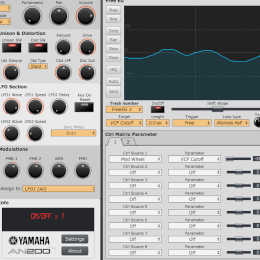
Ctrlr is a panel-based editor that lets you build custom control surfaces for your MIDI hardware. Instead of digging through tiny LCD menus, you can map parameters to knobs, sliders, and buttons on a graphical panel and drive everything from your computer. It's especially appealing if you have older rack units that sound great but are painful to program from the front panel.
Ctrlr really can help you “control your MIDI life”, but it does have a reputation for being complex. A look at the forums suggests a powerful tool with a steep learning curve. Tomlet created a helpful download called Ctrlr in 60 lessons, which is a good place to start.
Web MIDI Router Application
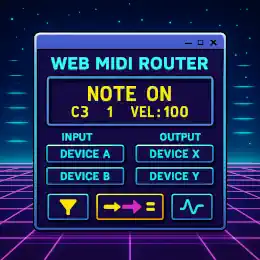
The Web MIDI Router is a browser-based tool that lets you inspect, filter, and redirect MIDI data in real time. It connects directly to your hardware or virtual MIDI ports using the WebMIDI API, making it ideal for troubleshooting MIDI setups, testing controllers, or experimenting with routing chains without installing additional software. The interface displays live MIDI messages as they pass through, allowing you to reshape or reroute them on the fly. It’s a lightweight, flexible utility that fits neatly into both retro-tech workflows and modern browser-based music experiments.
Other MIDI tools and resources to explore
- CSound is a sound and music computing system
- MIDI is the language of the Gods
- Pure Data Computer Music System
- Impro-Visor - Jazz improvisation advisor for the Improvisor
- I hope that this site returns in some form; in the meantime, the archived QuestStudios collection is still worth exploring. The site claimed to have a large selection of MIDI files in the QuestStudios Archive.
- jazz-soft test-midi-files
- Archive team The Geocities MIDI Collection