Which Old Computer Magazines Are Worth Collecting?
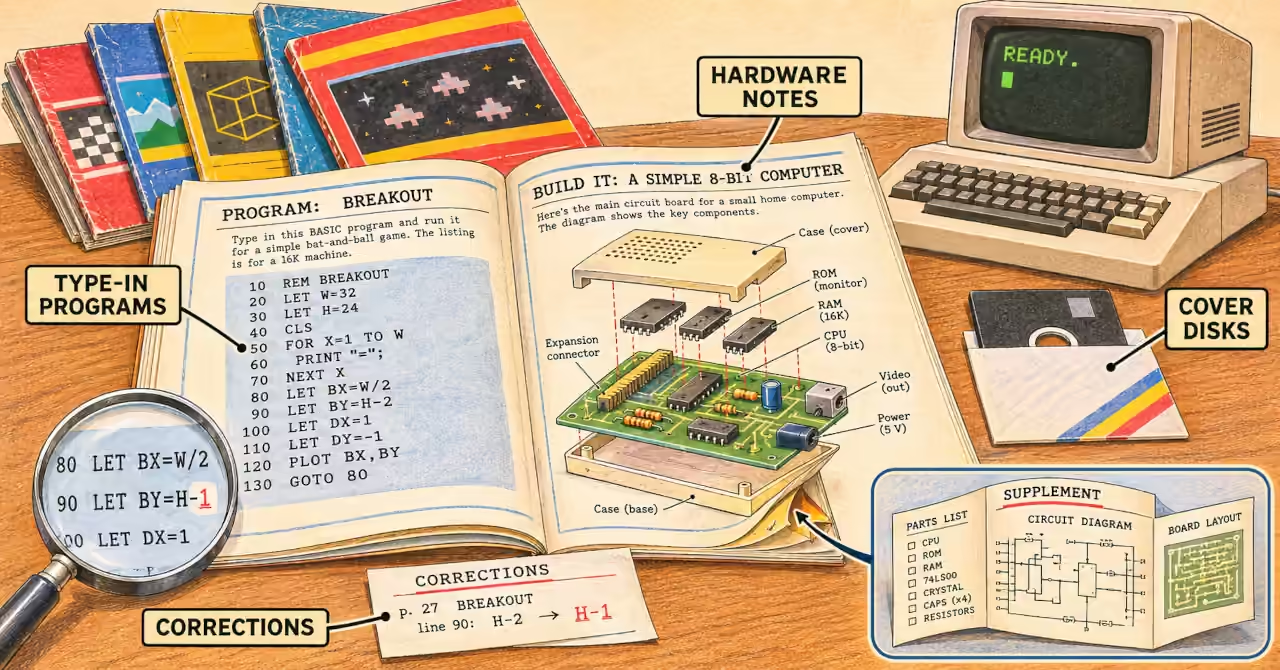
Useful, but for what?
The best old computer magazines still give you something to do, understand or question. That might be a BASIC listing, a hardware modification, a revealing comparison or a reader explaining why the advertised solution failed. Our selection of retrocomputer magazines offers a starting point; choosing which issues deserve shelf space means looking beyond the masthead.
This is a guide to building a collection you will read and use, rather than a price guide. A desirable cover, a childhood favourite or a handsome complete run can be reason enough to keep a magazine. There is another pleasure here, too: preserving a technical memory with its instructions intact.
The advice need not work on a modern computer to remain interesting. A memory-saving trick reveals the effort people spent squeezing more from their machines. A printer workaround shows how much work once sat between pressing a key and getting a page. Magazines preserve those small operational truths alongside the bigger announcements.
Start with a question, then choose a title
“I want to understand how people programmed this machine” gives you a useful way to choose between boxes of paper. These four starting points offer different routes into the subject. Browse their contents before committing shelf space.
COMPUTE! — programming and practical fixes
The COMPUTE! article index contains programming tutorials, hardware advice and reader corrections across several home-computer platforms. It is a promising starting point when you want to understand how people made their machines do more than the manual initially suggested.
Consider Harvey B. Herman's Hooray for SYS, in issue 8, January 1981, starting on page 96. It presents cassette utilities for the Commodore PET and distinguishes between original and upgraded ROMs. For a PET enthusiast, the value lies in that combination of programs, explanations and compatibility detail.
Then follow it to the correction published in issue 10, March 1981, page 164. This is a concrete collecting decision: keep the original instructions and their correction together. An attractive single issue becomes a more useful reference when you recover the rest of its conversation.
Softalk — a platform and its people
The Softalk Apple Project records a run from September 1980 to August 1984. Its issue profiles offer a manageable way into an Apple-centred collection. Programming sits within the culture of the people buying, using and discussing the platform, helping you see how a user community understood its own machines.
BYTE — connections across computing
The BYTE archive at Vintage Apple includes issues themed around cassette interfaces, speech synthesis and computer music systems. That breadth suits a curious reader who arrives for computers and leaves thinking about sound or automation. Choose a theme that opens a door for you; a famous masthead alone does not make every issue equally rewarding.
Australian Commodore and Amiga Review — the local perspective
The Australian Commodore and Amiga Review collection offers a regional counterpart to those American titles. Look at dealer advertisements, prices, letters and software coverage alongside the technical articles. They help answer a different question: what did owning and using these computers look like in Australia?
Reliability beats romance
After deciding whether an article interests you, ask how much confidence its advice deserves. Look for test conditions, stated configurations and compatibility notes. A benchmark without its machine configuration is a weaker comparison. A hardware tip that omits the relevant board or ROM revision may be incomplete advice.
Corrections, caveats and workarounds are evidence of the magazine meeting actual use. They do not make a publication infallible, but they help you investigate its claims. Cross-check instructions against the relevant documentation before applying them to surviving hardware.
A useful collection keeps the instructions, the conditions and the corrections together.
Historical value is a separate matter. An inaccurate prediction can reveal what a contributor expected at the time. An advertisement records a sales claim, rather than independently proving performance. Read each item for the kind of evidence it can provide.
Collect the ecosystem
A short consecutive run can reveal changes that an isolated issue conceals: a peripheral arrives, readers discuss it, competing products appear and expectations shift. Indexes, annuals and special guides help you find those connections without searching every page again.
Make a simple catalogue as you read. Record the article title, credited author, issue date and printed page numbers. Add the machine or software version where relevant, a link to any digital copy, and one sentence explaining why the item matters. That last note is what makes your catalogue more useful than a list of possessions.
Leave room for material beyond technical features. Club notices, letters and small advertisements can reveal the support networks around a machine. Nor must the collection stop at the end of the 1980s: later magazines can document multimedia, networks and enthusiast communities just as closely. Choose the period in which your question is alive.
What does the paper add?
Scans let you explore widely before acquiring a roomful of magazines. Good page images preserve layout, while searchable text helps locate subjects. Check the particular copy, though: missing pages, cropped margins, unreadable listings and omitted fold-outs can limit its usefulness.
Optical character recognition can also confuse characters even when the page image is clear. When entering a program, compare doubtful text with the scanned page rather than trusting the transcription alone.
A physical copy adds size, binding, paper, loose material and any annotations in that particular object. Those qualities may support your research or simply make reading more enjoyable. Decide whether they add enough to justify keeping the paper as well as the scan.
Cover disks and tapes need separate attention. A cover announcing a disk does not establish that its contents have survived. Record whether the media are present, whether a digital image is available and whether it has been checked. For a different publishing format, 880 Gamer Issue 8 introduces the pleasures of an Amiga disk magazine.
Before you bring home a box
- Name its purpose. Pick a machine, subject or historical question. Leave room for a delightful exception.
- Sample the contents. Browse an archive or inspect several issues. Check that the articles interest you as much as the covers.
- Check condition and completeness. Look for damp, mould, musty odours, brittle paper and rusty staples, as well as missing pages, cut-out material and detached covers. Check supplements and promised media separately.
- Check readability. Make sure listings and diagrams remain legible, including text close to the binding.
- Find the supporting issues. Seek the next instalment, correction or index needed to make the material useful.
- Count the whole commitment. Include transport and dry storage space in your decision. A large run takes room long after the excitement of finding it.
- Catalogue the discovery. Note what made the issue worth keeping before it disappears into a stack.
Follow the conversation
The old computer magazines worth keeping are the ones you want to open again. Their appeal may be a programming trick, a stubborn fault, an ambitious idea or a glimpse of everyday computing life. Start with an issue that answers a question, then let its references, letters and follow-ups guide your next discovery.
To follow that conversation closer to home, continue into the Australian Commodore and Amiga Review. Its pages offer another way to explore familiar machines: through the local publications and people surrounding Australia's Commodore community.
Featured Product
Analogue Computer Series 001 T-Shirt
If old computer magazines earn their shelf space through curiosity, this design earns a place in your wardrobe. The Analogue Computer Series 001 T-Shirt celebrates early computing with electric brains, switches and glowing indicators — for readers who turn straight to the technical diagrams.
Disclosure: this is a commercial product link to an external Zazzle store associated with philreichert.org. Purchases are handled by Zazzle.

Writer's Notes
What keeps me reading old computer magazines is the possibility of finding an idea that still has somewhere to go. A listing, a reader's letter or an overlooked advertisement can send me down a surprisingly productive rabbit hole. I value these magazines for what they help me notice: how people approached a problem, what they expected from their machines, and which possibilities remain worth exploring.
Reader Guide
The following material expands on the terminology, historical context, technical concepts, and related reading connected to this article.
Glossary
- Type-in program
- Software printed as a listing for a reader to enter into a computer. Typing it yourself does not settle questions of ownership, as explored in Who Owns a Type-In Program Forty Years Later?
- Erratum
- A correction to a published error; the plural is errata.
- ROM revision
- A particular version of software stored in read-only memory, potentially affecting compatibility or behaviour.
- OCR
- Optical character recognition: conversion of text in a page image into machine-readable characters.
- Disk image
- A file representing the contents and, depending on its format, aspects of the structure of a disk.
Frequently asked questions
Which old computer magazines should I start with?
Start with the machine or subject you want to understand. COMPUTE! offers programming material, Softalk an Apple-centred community record, and BYTE a broader technical range. Browse contents before choosing a run.
Are physical copies worth keeping when scans exist?
Yes, when you value the physical reading experience, the object itself, annotations or inserts. Check the scan first: a complete digital copy may already provide everything needed for your research.
Is a complete run better than individual issues?
A run helps trace series, corrections and changing opinions. Individual issues may be more useful when your interest is narrow. An index makes either approach easier to use.
Related articles…



References and archive starting points
- Classic Computer Magazine Archive: COMPUTE! article index. Early contents and the January 1981 CAPUTE! entry support the examples of practical material and corrections.
- The Softalk Apple Project: issue profiles. Publication span and issue-level route into the magazine.
- Vintage Apple: BYTE magazine library. Catalogue of scanned issues, including the technical themes mentioned above.
- Who Owns a Type-In Program Forty Years Later? PhilReichert.org explores the copyright, preservation and redistribution questions surrounding vintage magazine listings.
Archive catalogues consulted 14 November 2026. These references establish the examples and provide reading routes; the collecting advice is the article's editorial assessment. A catalogue entry does not guarantee that every scan or accompanying medium is complete.
Disclosure
This article was prepared with AI-assisted research and drafting using the referenced archives and published material. Collecting recommendations reflect editorial judgement, not market valuations or investment advice. Historical listings and hardware instructions may contain errors or depend on specific equipment revisions. Archive availability does not establish completeness or permission to reproduce the material; check relevant rights before redistributing scans or software.