How Computers Helped Shape the 1980s Synth Sound
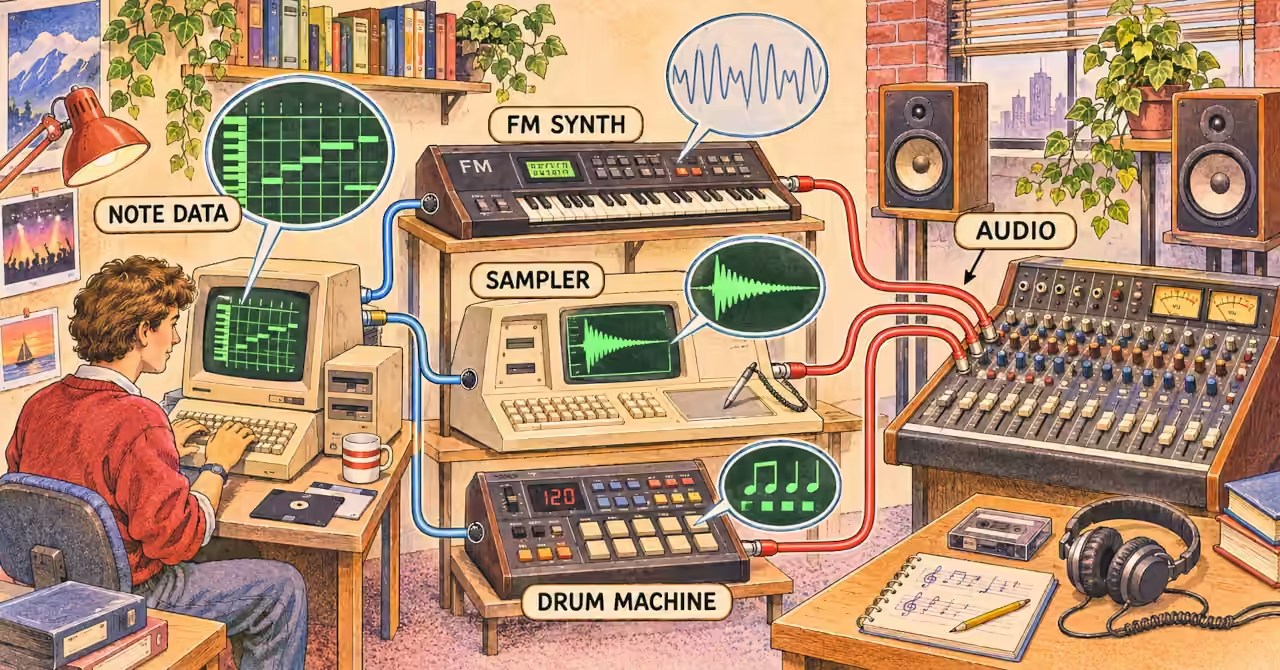
Inside the 1980s studio
A bass line repeats with clockwork timing. A keyboard rings like glass. A burst of recorded sound becomes a musical hook. These are familiar parts of the 1980s synth sound, but they did not all come from the same kind of machine.
Our look at a Commodore 64 music workstation in 1986 puts a computer at the centre of a musician’s desk. Follow its cables, though, and a bigger story appears. The computer might remember the notes while a separate instrument makes the sound. Another machine might do both.
To understand what changed during the decade, follow three jobs: creating sounds, storing performances and getting equipment to work together. Each gave musicians a different kind of freedom.
Three jobs behind the music
| Job | What it controls | Example |
|---|---|---|
| Creating sound | The tone or recorded sound we hear | A DX7 making a synth voice; a Fairlight playing a sample |
| Storing and editing a performance | Which notes play, when they start and how long they last | A sequencer recording and replaying note events |
| Working together | How devices exchange instructions or follow a shared beat | MIDI connections between a keyboard, sequencer and sound module |
One machine could do more than one job. A digital synthesiser, for example, carries out calculations to create sound inside the instrument. It does not need a desktop computer beside it. The useful question is what the machine does, rather than whether its case looks like a computer.
First, the machine remembered the pattern
Before a studio could link its instruments through MIDI, musicians were already exploring machines that remembered what to play. In 1977, Roger Linn built a programmable drum machine and sequencer around a COMPAL-80 computer. He wrote software in BASIC and assembly language that displayed a rhythm grid. Extra electronics connected the computer to a drum sound generator and an external analogue synthesiser. [1]
The jobs were already separate: the program held the pattern, while the connected sound circuits supplied the tones. Linn’s account makes the idea easy to picture. A beat could exist as instructions on a screen before anyone heard it through a speaker.
Roland’s history places its MC-8 MicroComposer in the same year. It was the company’s first music sequencer built around a microprocessor: a chip that carries out program instructions. [2]
Memory changed the creative task. A musician could design a repeating part and let the machine replay it, leaving time to work on another layer. The performance now included choosing and programming the pattern, as well as playing the keys.
Then the instruments learned a shared language
Remembering a pattern was useful. Sending it to equipment from another manufacturer was a further challenge. MIDI helped solve that problem by giving instruments a shared language. The MIDI Association traces the discussions from 1981 to a public demonstration in January 1983, when instruments from Sequential and Roland were linked at the NAMM music trade show. [3]
A MIDI message can tell an instrument which note to play, when to start and when to stop. It does not contain the sound itself. The receiving instrument supplies that. Our SID versus MIDI comparison follows the same distinction from the home-computer side.
Think of a simple bass phrase recorded into a MIDI sequencer. One note is wrong, so the musician changes that note without playing the whole phrase again. Next, they repeat the phrase across four bars. Finally, they choose a different sound on the synthesiser. The notes and rhythm stay the same, but the bass takes on a new character.
Those changes act on different things. Editing the sequence changes the performance. Choosing or editing a patch, the instrument’s sound settings, changes its tone. Together, they let musicians build a part in stages.
There was still setup work to do. Devices supported different features, and machines following a shared beat needed the right clock settings. The cables made communication possible; the musician made the system work.
The DX7 calculated the sound
Once the instructions reached an instrument, something still had to turn them into audio. Yamaha’s DX7, released in 1983, did this with digital FM synthesis. Its piano-like and synth-bass voices became an important part of its identity. Yamaha also records its MIDI connections and cartridges for storing or supplying sounds. [4]
FM synthesis uses rapid modulation, where one oscillation changes another, to create different tone colours. In the DX7, a dedicated digital sound engine did the calculations. A player could perform directly on its keyboard, or a sequencer could send it note instructions.
This is where “computer-assisted” becomes an interesting term. The DX7 could make sound without a separate computer, yet calculation was central to how it worked. Computing was already inside the instrument, not just sitting beside it on a desk.
The Fairlight turned recordings into instruments
The Australian Fairlight CMI opened another path. Instead of creating every tone through synthesis, it could capture a recording and make that sound playable. This process is called sampling. Powerhouse documents the Fairlight’s sampling and sequencing software, along with tools for changing waveforms on its screen. [5]
A recording could now become part of an instrument. A musician could trigger a captured sound from keys, place it in a sequence and build an arrangement around it. Recording, sound design and composing began to share the same workspace.
That did not mean sampling invented the ability to shape a tone. Synthesis already offered ways to do that. Sampling brought recorded audio into the process as material a musician could play and arrange.
You can hear the idea in the NFSA’s Fairlight sound demonstration. Listen for the GLASMASH sample associated with Kate Bush’s Babooshka, then try ORCH5, identified in Yes’s Owner of a Lonely Heart. The archive also links SARARR to Tears for Fears’ Shout and LOWSTR2 to U2’s The Unforgettable Fire. A short recording becomes a recognisable part of a song. [6]
Here, the computer-based system helped create the sound as well as organise it. Fairlight models developed over time, so their features varied, but the larger idea was clear: recorded sound could become a building block for new music.
The screen became a place to arrange music
As these tools developed, home computers offered another way to work on a performance. Steinberg’s history records Pro-24 for the Atari ST in 1986, with 24 MIDI tracks, musical notation, timing correction and editing of note velocity, a value often used to control loudness or tone. Cubase 1.0 followed in 1989. [7]
These tools made musical instructions easier to inspect and revise. A musician could work on the timing of a part, change how strongly notes were triggered and organise several parts together. The screen became a working view of the arrangement.
A MIDI track still differed from an audio recording. It stored instructions for an instrument to perform, rather than a recording of the resulting sound. That left room to change the notes and the instrument separately, as in our bass-phrase example.
Hear the layers behind a favourite song
Try listening to a favourite 1980s recording with those three studio jobs in mind. First, notice the sound: a bright attack, a deep bass tone or a short sampled burst. Then follow the arrangement: what repeats, what changes and when a new part enters.
Finally, look for evidence about how it was made. A musician’s account, session notes or an archive can connect what you hear to the equipment used. A steady beat alone cannot prove that a computer was involved. Listening gives you questions to explore; documented accounts help answer them.
What emerges is a wider view of musicianship. Playing mattered, but so did programming patterns, choosing sounds, editing notes and keeping the equipment in time. The setup itself became part of the creative work.
A musician learning to play a system
The 1980s synth sound grew from several kinds of invention working together. Sequencers remembered performances. MIDI carried instructions between devices. Digital synthesis calculated tones, while samplers turned recordings into playable material.
Musicians used those tools to make choices that mattered: the shape of a bass line, the character of a keyboard sound, the moment a sample entered. Some artistry stayed in the fingers, some moved into programming, and some lay in bringing the whole studio together. A musician was learning to play a system.
That raises the next question: how do we preserve an instrument when its character depends on both its sound and the software running inside it? Continue with MAME Is Preserving Vintage Synthesizers and Samplers to explore how recreating these machines in software can preserve more than their familiar tones.
Featured Product
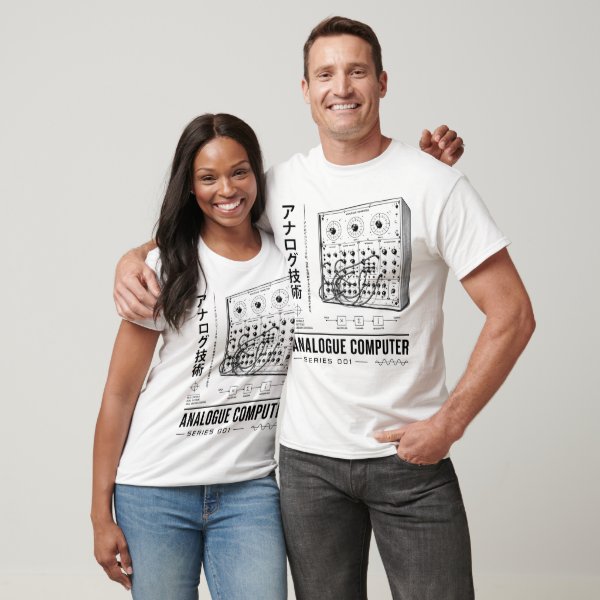
Analogue Computer Series 001 T-Shirt
Love the machinery behind the music? Carry that curiosity beyond the studio with the Analogue Computer Series 001 T-Shirt. Its computing-history design celebrates an age of switches, circuits and glowing indicators — a fitting choice for anyone drawn to the machines behind the sounds.
Disclosure: this featured product links to a Zazzle store associated with philreichert.org. Purchases support the publisher and are handled by Zazzle.
Reader Guide
The following material expands on the terminology, historical context, technical concepts, and related reading connected to this article.
Glossary
- FM synthesis
- A sound-generation method in which one oscillator rapidly modulates another to create a range of timbres, from bell-like tones to complex bass sounds. The Yamaha DX7 uses a dedicated digital implementation.
- MIDI
- Musical Instrument Digital Interface: a standard for exchanging note events, performance controls and other musical instructions between devices. MIDI carries instructions rather than audio. Explore this distinction in SID vs MIDI: Two Ways Computers Make Music.
- Sequencer
- Hardware or software that stores and plays an ordered series of musical events, such as notes, durations and controller changes. A MIDI sequencer directs a receiving instrument; it need not generate sound itself.
- Sampling
- Capturing audio as digital data so it can be stored, manipulated and replayed. In a musical sampler, a recording can become playable material controlled from keys or a sequencer. For the preservation of these instruments, see MAME Is Preserving Vintage Synthesizers and Samplers.
- Quantisation (timing)
- Adjusting musical event timing towards a chosen rhythmic grid, such as sixteenth notes. Depending on the settings, this can tighten a performance while retaining some timing variation. It is distinct from amplitude quantisation in digital audio.
- Timbre
- The character or tone colour that distinguishes sounds of similar pitch and loudness. It includes how a sound begins, its harmonic content and how it changes over time.
Frequently asked questions
Does MIDI carry the sound of a synthesiser?
No. MIDI carries musical instructions and control information. The receiving instrument generates or plays the audio.
Did the Yamaha DX7 need a desktop computer?
No. Its dedicated digital FM engine generated sound inside the instrument. MIDI allowed other equipment to control it.
Was the Fairlight only a sequencer?
No. It was a computer-based musical instrument with sampling and sequencing facilities. Capabilities varied across its generations.
Can you hear whether a record used a computer?
Listening can suggest questions, but timbre and tight timing alone do not establish the equipment or workflow. Session evidence is needed.
Related articles…


References and listening
Explore the machines and ideas discussed in this article through manufacturer histories, an inventor’s account and Australian museum and archive collections. Sources consulted 14 November 2026.
- Roger Linn Design. Museum. Linn describes his 1977 COMPAL-80 prototype, including its rhythm grid, programming and connections to external sound-generating hardware.
- Roland. Our History. The 1977 entry introduces the MC-8 MicroComposer, Roland’s first microprocessor-based music sequencer.
- The MIDI Association. MIDI History Chapter 6: MIDI Begins 1981–1983. Traces the industry discussions and technical cooperation leading to the January 1983 public demonstration.
- Yamaha. DX7 — Innovation Road. Documents the 1983 synthesiser, its FM sound engine, MIDI connections and cartridge-based sound storage.
- Powerhouse Collection. Digital synthesiser by Fairlight Instruments, object 86/474. Explains the Fairlight’s Australian development and its computer-based sampling, sequencing and waveform-editing facilities.
- National Film and Sound Archive of Australia. Sampling Sounds: Fairlight CMI. Listen to four Fairlight samples and discover their connections to recordings by Tears for Fears, Yes, Kate Bush and U2.
- Steinberg. Company history. The timeline covers Pro-24 for the Atari ST in 1986 and the arrival of Cubase 1.0 in 1989.
Disclosure
This article draws on published manufacturer histories, archival collections and documented examples to explain selected technologies behind the 1980s synthesiser sound. It is not a comprehensive survey of recording sessions, and a particular sound alone cannot establish which equipment or production methods were used. The banner is an AI-generated illustrative reconstruction, not a photograph or an exact wiring diagram. AI tools assisted research and drafting; the article was reviewed and edited by the publisher. Product names identify the technologies discussed and do not imply endorsement or affiliation.