ChatGPT Canvas Markdown Commands
◆ Revised

Introduction
ChatGPT Canvas was one of OpenAI's early attempts to move AI-assisted writing beyond the ordinary chat window and into a more structured editing workspace. When it first appeared, the idea was genuinely exciting: a place where longer documents, plans, drafts and code could be developed beside the conversation that created them.
This article was originally written during that early Canvas period. At the time, I used Canvas frequently for planning, writing and organising information. Over time, however, my own workflow shifted toward ChatGPT Projects, which proved more useful for managing long-running work, reference files and repeated publishing activities.
Eighteen months may not sound very long, but in generative AI it is practically an epoch. The interface has changed, user habits have changed, and the broader ChatGPT workspace has evolved. What remains useful, however, is Markdown. Headings, lists, links, tables and code blocks are still among the simplest ways to structure information clearly inside ChatGPT, static websites, documentation systems and publishing workflows.
What Was ChatGPT Canvas?
ChatGPT Canvas was introduced as a dedicated workspace for longer-form writing and coding tasks. Rather than keeping every draft inside the scrolling chat conversation, Canvas provided a separate editable area where content could be revised, expanded and reorganised.
In practical terms, Canvas represented an early bridge between chat-based prompting and document-based collaboration. It suggested that AI tools would not remain confined to question-and-answer exchanges. Instead, they would become places where users could build, edit and refine larger pieces of work.
For some users, Canvas became a useful drafting tool. For others, including me, the idea was stronger than the interface. While I appreciated the concept, I often found the editing experience awkward and eventually returned to standard chat workflows before later adopting Projects. That tension is part of what makes Canvas interesting historically: it showed the direction AI workspaces were heading, even if later tools became better suited to sustained work.
Why Markdown Still Matters
Markdown remains useful because it is simple, portable and readable. It allows a writer to create structure without needing a complicated editor. A heading looks like a heading, a list looks like a list, and a link can be written without interrupting the flow of thought.
In ChatGPT, Markdown is especially useful because it gives both the user and the assistant a shared structure. A request for a heading, table, checklist or code block can be expressed clearly. The result can then be copied into another tool, converted into HTML, saved as documentation or used as the basis for a static website page.
Essential Markdown Commands
One reason this article has remained useful is that Markdown itself has changed very little. The same commands that worked in Canvas continue to work across a wide range of modern writing and publishing tools.
Headers
# Header 1
## Header 2
### Header 3
#### Header 4
Use the hash symbol to create headings. The number of symbols determines the heading level.
Text Formatting
- Bold:
**text** - Italics:
*text*or_text_ Strikethrough:~~text~~- Inline code:
`code`
Blockquotes
> This is a blockquote.Tables
| Header 1 | Header 2 |
|----------|----------|
| Cell 1   | Cell 2   |
| Cell 3   | Cell 4   |
Code Blocks
```javascript
console.log('Hello, world!');
```
Bullet Lists
* Item 1
* Item 2
* Item 3
Numbered Lists
1. First item
2. Second item
3. Third item
Nested Lists
1. First item
   - Subitem 1
   - Subitem 2
2. Second item
   - Subitem 1
   - Subitem 2
Links and Images
[Link Text](URL)[Link Text][reference]
Canvas and the Evolution of AI Workspaces
Looking back, Canvas is perhaps most interesting as a snapshot of how quickly AI tools evolve. What seemed innovative in early 2025 soon gave way to broader workspace concepts that combined conversations, files, instructions and context.
In hindsight, articles such as this one have become small historical artefacts in their own right, documenting how people actually used early AI tools rather than how the vendors imagined they would be used.
Features such as Projects expanded upon many of the ideas that Canvas introduced. Rather than focusing on a single editable document, they created environments where entire bodies of work could be organised and maintained over time.
That does not make Canvas obsolete. It remains an interesting milestone in the history of AI-assisted writing, and it helped establish the idea that AI should support the work surrounding a task rather than simply answer questions.
Conclusion
ChatGPT Canvas belongs to a fast-moving period in the development of AI writing tools. While the interface itself has evolved, the Markdown techniques that made Canvas useful remain relevant today.
For me, Canvas ultimately became a stepping stone toward Projects and other workspace-oriented tools. Yet revisiting this article serves as a reminder that while AI interfaces change rapidly, clear structure, good organisation and simple text formatting continue to be valuable skills regardless of the platform being used.
Featured Product
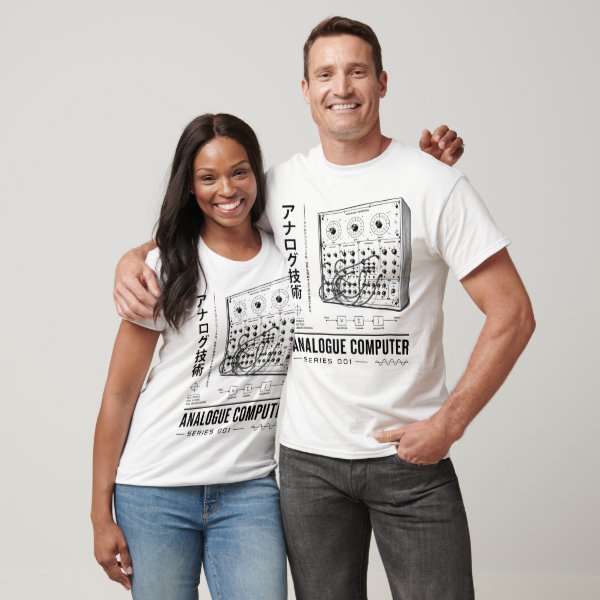
Analogue Computer Series 001 T-Shirt
This article looks back at ChatGPT Canvas as an early attempt to make AI-assisted thinking more visible and structured. Long before AI workspaces, engineers, hobbyists and experimenters built physical systems to explore logic, reasoning and decision-making. The Analogue Computer Series 001 T-shirt celebrates that tradition of visible thinking, electric brains, switches and learning machines—an era when the path from question to answer could be followed through wires and illuminated by the glow of a lamp.
Disclosure: this is a commercial product link to an external Zazzle store associated with philreichert.org. Purchases are handled by Zazzle.
Writer's Notes
When ChatGPT Canvas first appeared, I was an enthusiastic user. The idea of having a dedicated workspace for planning, writing and organising information felt like a significant step beyond the traditional chat interface, and I used it extensively for both personal and publishing projects. Over time, however, my workflow gradually shifted toward ChatGPT Projects, which proved better suited to managing larger bodies of work and long-running activities. Looking back, this article captures an interesting moment in the evolution of AI-assisted writing. Eighteen months may not sound like a long time, but in the world of generative AI it represents an entire epoch. While some details of Canvas have aged, the Markdown techniques remain as useful today as they were when this guide was first published.
Reader Guide
The following material expands on the terminology, historical context, technical concepts, and related reading connected to this article.
Glossary
- ChatGPT Canvas
- An early ChatGPT workspace designed for drafting, editing and collaborating on longer documents.
- Markdown
- A lightweight markup language that uses simple symbols to format text.
- ChatGPT Project
- A dedicated workspace within ChatGPT that groups together files, instructions and conversations around a single topic or body of work.
Frequently asked questions
Is ChatGPT Canvas still useful?
ChatGPT Canvas remains an interesting milestone in the evolution of AI writing tools. While many users now prefer Projects for managing ongoing work, Canvas helped demonstrate how AI-assisted writing could move beyond simple chat conversations into dedicated editing environments.
Why does Markdown still matter in ChatGPT?
Markdown remains one of the simplest ways to structure information using headings, lists, tables, links and code blocks. The same formatting techniques can be used across ChatGPT, Projects, documentation systems and static website publishing workflows.
Connected Threads
- The ChatGPT Projects Secret Most Users Miss - examines the next stage in ChatGPT's evolution, where Projects largely superseded Canvas as a workspace for managing ongoing activities and knowledge.
Related articles…



References
- Adapting to the Age of AI, philreichert.org
- ChatGPT Projects, philreichert.org
- Introducing Canvas, OpenAI
Disclosure
This article reflects the author's personal experience using ChatGPT Canvas and Markdown during the early development of AI-assisted writing workflows. OpenAI did not sponsor, review or influence the content of this article.