Inside the IBM 5100 - a computer that was ahead of its time!
◆ Revised

Introduction
The IBM 5100 is a rare gem in the world of vintage computers. Released in 1975, it was the first portable computer that could perform scientific calculations. Despite being overshadowed by later models, the 5100 played a significant role in the history of computing.
The IBM 5100 may look like a clunky and outdated computer by today's standards, but it was revolutionary for its time. Released in 1975, it was one of the first portable computers ever made and had a unique feature that allowed it to emulate different programming languages, making it a game-changer for businesses and developers alike. In this article, we'll take a deep dive into the IBM 5100 and explore why it was so significant in the evolution of computing.
What is a luggable computer?
A luggable computer is a type of personal computer that is portable, but larger and heavier than a laptop or notebook computer. It typically weighs between 20 and 50 pounds and is designed to be carried like a suitcase, with a built-in handle. Luggable computers were popular in the 1980s and early 1990s, before the development of smaller and lighter laptops. They were often used as portable workstations or for field work, but their size and weight made them less practical for everyday use.
The IBM 5100 is considered to be a luggable computer because it was designed to be portable, yet still too large and heavy to be easily carried around like a laptop. The computer weighed around 50 pounds and came with a built-in handle, making it possible to be transported from place to place, albeit with some difficulty. Its portability was a major selling point for the IBM 5100, as it allowed users to take their computer with them on business trips or to work remotely.
IBM 5100 Form factor

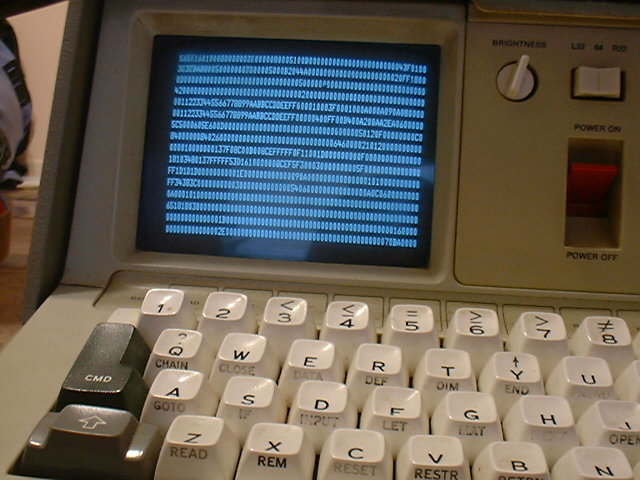

Historical context and significance
In 1975, the idea of a personal computer for business use was still in its infancy. Most businesses relied on large, expensive mainframe computers that required specialized knowledge and training to operate. However, the introduction of the Altair 8800, a build-it-yourself computer kit, sparked the interest of hobbyists and enthusiasts who saw the potential for personal computers to become more accessible and affordable. This led to the development of more user-friendly machines, such as the Commodore PET and the Apple II, which would eventually pave the way for the widespread adoption of personal computers in business and beyond.
Typical business applications that a business manager would use a computer for at that time included basic word processing, simple spreadsheets, and financial calculations. Accounting software was also beginning to be developed, as were early inventory management and customer relationship management (CRM) programs. However, the capabilities of personal computers in 1975 were quite limited compared to today's standards, and most business tasks were still done manually or with the help of larger mainframe computers.
APL (A Programming Language) was a popular programming language for the IBM 5100 computers. It was mainly used for mathematical and statistical analysis, financial modeling, and data processing applications. A typical APL program for IBM 5100 computers would be comprised of short, concise expressions that made use of a rich set of mathematical operators and functions. These expressions were often written using a compact, one-line notation that could be difficult to read for those unfamiliar with the language. However, APL's ease of use and power made it popular among analysts and statisticians in the business world.
Significance of the IBM 5100
The IBM 5100 introduced several innovations that became standards in the personal computer industry, such as its use of a CRT monitor and a built-in BASIC programming language. Its portability and compatibility with IBM mainframes made it popular among businesses, leading to the widespread adoption of personal computers in the workplace. The 5100 also paved the way for IBM's later personal computers, including the IBM PC, which became a cornerstone of the modern computing industry. Overall, the IBM 5100 played a significant role in the evolution of personal computing and left a lasting legacy in the business computer environment.
Yes, there were some reviews and articles written about the user experience of the IBM 5100 when it was first released. Some praised its portability and versatility, while others criticized its price and lack of software options. However, since it was a niche product aimed at a specific market, there may not be as many detailed accounts of the user experience as there would be for a more mainstream computer.
In its time, the IBM 5100 was a groundbreaking computer, and any suggestions for improvements would be based on technological advancements that occurred after its release. Some areas for improvement could include increased processing speed, greater storage capacity, and a more user-friendly interface. These are all common areas of improvement for computers in general, and advancements in these areas were made in subsequent generations of personal computers.
I think that most users would say, Just make the IBM 5100 lighter!
IBM 5100 collecting
The IBM 5100 is a classic example of early personal computing, and it holds a special place in the history of computing. For vintage computer enthusiasts, the IBM 5100 offers a glimpse into the early days of personal computing, when computer systems were just beginning to become accessible to individuals and small businesses. With its unique APL programming language and portable "luggable" form factor, the IBM 5100 is a fascinating piece of computing history that is sure to appeal to collectors and enthusiasts alike. Its rarity and historical significance make it a prized possession for vintage computer collectors, and its unique features and capabilities make it a fascinating piece of technology to explore and experiment with.
Collectors should look out for several things when buying a vintage IBM 5100, including:
- Condition‐Check the physical condition of the computer, including any cracks or damage to the case, keyboard, and screen.
- Functionality—Ensure that the computer powers on and runs as expected. Some vintage IBM 5100s may require maintenance or repairs to function properly.
- Accessories—Check that the computer comes with all necessary accessories, such as the power cord and any included software or manuals.
- Authenticity—Verify that the computer is an authentic IBM 5100, as there are many replicas and imitations on the market.
- Price—Finally, consider the price and whether it is reasonable given the condition and functionality of the computer, as well as the rarity of the model.
Getting replacement parts can be a real saga for these vintage computers. Many of the components used in older computers are no longer produced or readily available, so finding replacement parts can be a challenge. This can make repairing or restoring vintage computers difficult, and can also drive up the cost of replacement parts. It is important for collectors to do their research and make sure they have access to the parts and resources they need before purchasing a vintage computer.
The IBM 5100 and the disappearing front panel
One easily overlooked feature of the IBM 5100 is how modern its basic method of interaction already appeared in 1975. Contemporary microcomputers could still rely upon rows of switches and indicator lamps to inspect and manipulate the machine directly. The IBM 5100 instead combined its keyboard and CRT display with a built-in Diagnostic Control Program (DCP).
COMPUTE!'s [2] Gazette, looking back at this transitional period in 2026, places the 5100's DCP alongside early machine-language monitors such as WOZMON on the Apple-1 and SOLOS on the Processor Technology SOL-20. The comparison is revealing. These programs increasingly moved interaction with the computer away from physical front-panel controls and onto the screen.
The IBM 5100 therefore represents more than an unusually early portable computer. It also belongs to an important change in computer design. The computer's front panel was becoming software. Instead of watching lamps and operating switches, the user could increasingly inspect and control the machine through characters displayed on a CRT.
Featured Product
Analogue Computer Series 001 T-Shirt
If the IBM 5100 has you thinking about a time when portable computing meant fitting an entire computer, keyboard, display and storage system into a machine you could just about carry, the Analogue Computer Series 001 T-Shirt celebrates that wonderfully tangible era of computing. The IBM 5100 brought remarkable capability into a compact package at a time when computers were still substantial, specialised machines whose workings invited curiosity and understanding. From early portable computers to the machines that eventually put computing on every desk, wear a little of that history.
Disclosure: this is a commercial product link to an external Zazzle store associated with philreichert.org. Purchases are handled by Zazzle.

Writer's Notes
Reader Guide
The following material expands on the terminology, historical context, technical concepts, and related reading connected to this article.
Frequently asked questions
Curious about something you’ve just read? These frequently asked questions explore some of the key ideas, details and questions surrounding the topic.
What is the IBM 5100 and when was it released?
The IBM 5100 is an early portable, 'luggable' computer released in 1975 that could perform scientific calculations; it weighed around 50 pounds and had a built-in handle for transport.
Why is the IBM 5100 considered significant in computing history?
It introduced innovations that became industry standards—such as a built-in CRT display and BASIC, portability, and compatibility with IBM mainframes—and helped pave the way for later IBM personal computers like the IBM PC.
Which programming languages did the IBM 5100 support and what were they used for?
The machine included built-in BASIC and commonly ran APL, with APL used for mathematical and statistical analysis, financial modeling, and data processing; the 5100 could also emulate different programming languages to increase versatility.
What should collectors check before buying a vintage IBM 5100?
Collectors should inspect the physical condition, ensure the unit powers on and functions, verify included accessories and authenticity, and consider price, while also noting that replacement parts can be hard to find and repairs may be costly.
Related articles…

RetroGames A500
Mini journal

Adventure Vision
game console

Commodore VIC-20
gfx made easy
Amiga Applications
Archive
References and Further Reading
The following sources provide technical and historical background on the IBM 5100, its hardware, programming languages and place in the development of portable computing. They include contemporary IBM manuals, technical documentation and historical sources that help place the 5100 and its capabilities in context.
- IBM 5100 BASIC User Manual, bitsavers.org (retrieved 2026-09-05)
- Lewis, Steve. “Dawn Before the Trinity: 1974–76.” Domesticating the Computer, COMPUTE!’s Gazette, Vol. 2, No. 4, April 2026, pp. 20–25.
Disclosure
This article was prepared using a combination of original research, published sources, archival material, and digital research and writing tools, including the use of large language model tools. Sources are referenced where appropriate. The author reviews and edits the article and may make ongoing editorial updates. Any commercial relationships, affiliate links, sponsorships, or other material interests relevant to the article are disclosed separately where applicable.
Change log
- [2023-02-28] Initial release
- [2023-04-21] Fixed description length
- [2026-08-29] Added banner image and fixed H1
- [2026-09-06] Added discussion of the IBM 5100 DCP and the transition from physical front panels to software interfaces