AKAI MPC Comparison Chart
Updated 23 November 2025

Whether you're a seasoned producer or just starting your musical journey, Akai MPCs offer a world of possibilities. Each model in this comparison brings its own strengths, catering to different workflows and production needs. Explore the features and nuances of the MPC1000, MPC2500, MPC5000, MPC One, and MPC X to find the perfect companion that resonates with your creative vision. I currently own an MPC One and have spent years using it as my main DAW-less rig. Let the power of Akai MPCs fuel your musical imagination and propel you towards sonic excellence.
Background
The Akai MPC is a series of electronic musical instruments used for creating and sequencing music. Akai’s music division launched the first MPC in 1988. The first MPC, the MPC60, was introduced in 1988 and quickly gained a following among hip-hop producers, who appreciated its intuitive workflow, ability to sample and sequence multiple sounds, and the "swing" function which allowed for a more humanized groove.
The Akai MPC has a rich and influential history in the world of music production, and is widely considered to be a groundbreaking and innovative instrument that has had a profound impact on the development of hip-hop and electronic music. Its story is one of underground innovation and creativity, driven by a desire to make high-quality music production accessible to a wider range of musicians.
So what does MPC stand for? MPC originally stood for MIDI Production Center. The MPC has evolved over time. The new owners now state that MPC stands for Music Production Center. I think that this is a fair change and it reflects the ever increasing power of the MPC system. The original MPCs are famous for sampling and sample editing. The current MPC releases are so powerful that they are considered to be one of the most capable DAW-less setups available. I think that its hidden talent is the MPC's powerful sequencing engine for driving MIDI-enabled devices. I hope to learn more about the MIDI-enabled capability as my skills develop.
My Akai MPC Journey
I never really got into playing music. My piano skills are basic. I love Amiga tracker music but never worked out how to code a tracker song. That was then and everything has developed and tools have matured. I was looking for a sample based player and some form of MIDI control. The Akai MPC One comes with this functionality and more to start making music. Beats are the easiest and most advertised function of the MPC. It is more than that. It is also an easy to use MIDI controller and sequencer. There are also programmable synthesizers built in to manipulate and control sound. The Akai MPC One is a very capable DAW-less machine.
I am interested in retro-computers and vintage hifi. eBay was one of the first marketplaces that I search for vintage MPC machines. Wow. I am gobsmacked by the level of interest and prices for vintage MPC machines. I knew that I was onto something. After a lot of searching around and dreaming of that vintage sound I bought a new machine. I feel that the price of a new MPC One is very reasonable. The MPC One does not feel like a crippled MPC X. The MPC One is a powerful machine that cover the DAW-less landscape.
I saw an old Akai advertisement showing the various MPC options. Due to its age, the modern MPC options were not shown. I have created my own MPC comparison chart. There is limited space on a chart such as mine and I couldn't list every MPC ever made. The Akai MPCs that I have listed are machines that I feel are comparable and of interest to me. I have listed three generations of Akai MPC machines. The Akai machines I compared are the MPC1000, MPC2500, MPC5000, MPC One, and MPC X. I didn't list the Akai MPC Live as I feel that this machine is priced at a premium to the market.
Akai MPC5000
The Akai MPC5000 is a music production workstation that combines a sampler, sequencer, drum machine and virtual analog synth in a single unit. It offers a large, clear screen and an interface that makes sampling, chopping, sequencing and sound design straightforward. I've not owned an MPC5000 personally, but after spending time with the manual, demos and user reviews, I can't help but be amazed by the MPC5000's extensive features and capabilities. It boasts a large and intuitive interface, allowing me to effortlessly sample, chop, sequence, and manipulate sounds to bring my musical ideas to life. With its built–in effects, expansive memory, and flexible connectivity options, the MPC5000 empowers me to craft intricate beats, intricate melodies, and intricate arrangements with precision and creativity. Whether I'm in the studio or performing live, the MPC5000 is my go-to companion for unleashing my musical passion and pushing the boundaries of sound.
Akai MPC5000 Screenshots


Akai MPC5000 Review

Music Radar has a balanced review of the Akai MPC 5000, a music production center that combines drum machine, sampler, sequencer, synth and audio recorder. The article praises the MPC 5000 for its superb workflow, large screen, Q-link controls, synth/arpeggiator, effects and hard disk recording features. However, the article also criticizes the MPC 5000 for its lack of 24-bit/96kHz support, CD/DVD burner as standard, keygroup function and some sound quality issues. The article concludes that the MPC 5000 is a worthy and versatile addition to the MPC range, but not a true successor to the MPC 4000.
Akai MPC File Formats
| Suffix | Description | Format |
|---|---|---|
| .als | Sequence exported to Ableton Live Set | ♙ |
| .50s | MPC5000 Program | ♙ |
| .pgm | MPC1000/MPC2500 Program (16bit only) | ♙ |
| .seq | MPC1000/MPC2500 sequence | ♙ |
| .mpcpattern | MPC track exported as a pattern | ♙ |
| .mcn | MPC MIDI control scene | XML |
| .xpa | Project archive | ♙ |
| .mid | MIDI file format | binary |
| .sqx | MIDI-like file format | binary |
| .mp3 | Sound sample (compressed) | binary |
| .wav | Sound sample (uncompressed) | binary |
| .jpg | MPC Expansion pack thumbnail (1000x1000px) | binary |
| .xpm | MPC Program settings | XML |
Running the inMusic Software Center on Linux (Wine)
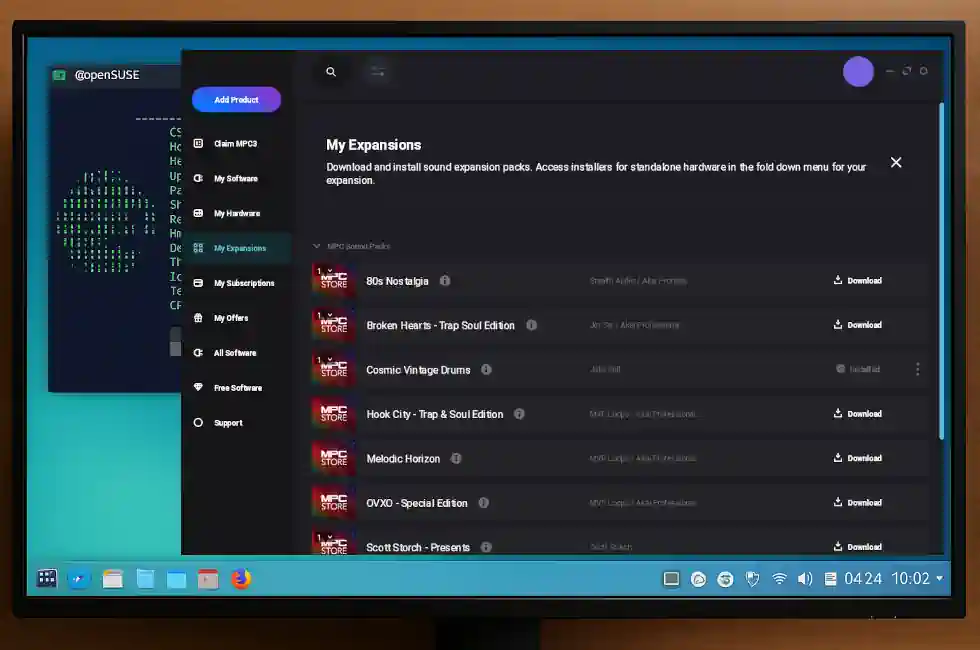
After switching to Linux (OpenSUSE with KDE), I was unsure whether I would still be able to download and install Akai expansion packs. The inMusic Software Center is officially only provided for Windows and macOS, so purchasing expansion packs felt risky—nobody wants to buy a sound pack they can't even download.
I am pleased to report that the Windows version of the inMusic Software Center installed and ran successfully under Wine. I was able to log in to my inMusic account, download the expansion I had just purchased, and install it without any critical issues.
Download & Install Process
- Installed the inMusic Software Center using Wine.
- Logged in normally with my inMusic credentials.
- The downloader ran correctly and saved files to:
~/Downloads/inMusic - The installed expansion pack was placed in:
~/.wine/drive_c/ProgramData/Akai/MPC/content/<samplepack>/
In my test case, I purchased and installed the Cosmic Drums expansion pack, and it appeared exactly where the MPC expects its content. The pack loaded on my MPC hardware without any problems.
Disclaimer
This is simply my personal experience using Linux (OpenSUSE, KDE) and Wine. I have not tested other configurations, VST installations, or more complex software components. I am sharing this information to help other Linux users attempt the same process, but there are no guarantees of performance, compatibility, or long-term stability. Your results may vary depending on your Linux distribution, Wine version, system settings, and hardware.
If you try this yourself, I’d be interested to hear how it works on other Linux systems.
Copying Expansion Packs to an SD Card for the MPC
Once the expansion pack has been downloaded and installed under Wine, the next step is to move it onto an SD card so the MPC can see it as an expansion. In my case, the pack was installed under:
~/.wine/drive_c/ProgramData/Akai/MPC/content/<samplepack>/
I then performed the following steps:
- Inserted the SD card that I use with my MPC into my Linux workstation.
- Created or opened the folder on the SD card where my MPC expansions live.
- Copied the entire
<samplepack>directory from the WineProgramData/Akai/MPC/contentlocation to the SD card. - Copied the corresponding
Expansion.xmlfile and the 1000x1000 thumbnail image for the pack, keeping them alongside the expansion folder so the MPC can read the metadata.
The Expansion.xml file is important: it tells the MPC the pack name, identifier, directory
and which image file to use for the expansion tile. Without it, the MPC can still access the content, but
the expansion grid may only show a plain box labelled with the first letter of the folder name (for
example, a generic tile with a "C" if your folder name starts with
"Cosmic"). With Expansion.xml and the artwork in place, the MPC displays the
proper expansion name and custom image.
After copying the folder, Expansion.xml, and the artwork file to the SD card, I safely
ejected it, inserted it into the MPC, and confirmed that the expansion appeared in the list with its
correct name and thumbnail.
Playing SoundFonts on the Akai MPC

Here is a tricky question; How can one play SoundFonts on the Akai MPC One? The answer is that the Akai MPC One does not directly play SoundFonts. I tried to place .sf2 soundfonts into a directory and my MPC did not see the file in the file browser. The answer lies in converting .sf2 SoundFonts into Akai MPC keygroups.
It is with some luck that I have come across the ConvertWithMoss multisample conversion application. The ConvertWithMoss application runs on all of the major platforms and can readily convert .sf2 files into Akai MPC Keygroups. The application interface is very simple and easy to get the hang of. There is also the excellent ConvertWithMoss Manual that explains the logic of the application in more detail. This application is released under LGPLv3 with the latest source code available on GitHub.